Axonius API
Axonius is a cybersecurity asset management platform that provides comprehensive visibility and control over all devices, users, cloud instances, and SaaS applications in your environment. The Axonius API enables programmatic access to asset data, compliance information, and security insights, allowing organizations to integrate Axonius data into their security operations, reporting, and automation workflows.

Power end-to-end data operations for your Axonius API API with Nexla. Our bi-directional Axonius API connector is purpose-built for Axonius API, making it simple to ingest data, sync it across systems, and deliver it anywhere — all with no coding required. Nexla turns API-sourced data into ready-to-use, reusable data products and makes it easy to send data to Axonius API or any other destination. With comprehensive monitoring, lineage tracking, and access controls, Nexla keeps your Axonius API workflows fast, secure, and fully governed.
Features
Type: API
- Seamless API Integration: Connect to any endpoint as source or destination without coding, with automatic data product creation
- Visual Composition & Chaining: Build complex integrations using visual templates, chain API calls, and compose workflows with data validation and filtering
- API Proxy: Expose curated slices of your data securely with a secure and customizable API proxy that validates and transforms data on the fly
- Request optimization with intelligent batching, retry, and caching to minimize API calls and costs
Prerequisites
Before creating an Axonius API credential, you'll need to obtain API credentials from your Axonius instance. Axonius uses API key and client secret authentication for API access.
Axonius API Credentials Setup
To obtain the required API credentials for Axonius API access:
-
Log in to Axonius: Access your Axonius instance using your administrator credentials.
-
Navigate to API Settings:
- Go to Settings > API (or Administration > API Settings)
- Locate the API credentials section
-
Generate API Credentials:
- Click Create API Key or Generate Credentials to create a new API key pair
- You'll receive:
- API Key: A unique identifier for API authentication
- Client Secret: A confidential key used for authentication
- Copy both values immediately, as the client secret may only be displayed once
-
Note Your Axonius Host URL:
- Record your Axonius instance URL (e.g.,
https://your-instance.axonius.comorhttps://axonius.yourdomain.com) - This is the base URL for your Axonius deployment
- Record your Axonius instance URL (e.g.,
Axonius API credentials are specific to your Axonius instance and should be kept secure. The API key and client secret are used together for authentication via custom headers. For detailed information about Axonius API authentication, refer to your Axonius instance documentation or contact your Axonius administrator.
API Access Requirements
Axonius API access requires:
- Axonius Instance Access: You must have access to an Axonius deployment
- Administrator Permissions: API credential generation typically requires administrator-level access
- API Key and Secret: Both the API key and client secret are required for authentication
- Network Access: Ensure your network allows connections to your Axonius instance URL
Authenticate
Credentials required
| Field | Required | Secret | Description |
|---|---|---|---|
| Axonius Host URL | Yes | No | Axonius Host URL |
| Axonius API Key | Yes | Yes | Axonius API Key |
| Axonius Client Secret | Yes | Yes | Axonius Client Secret |
Create a credential in Nexla
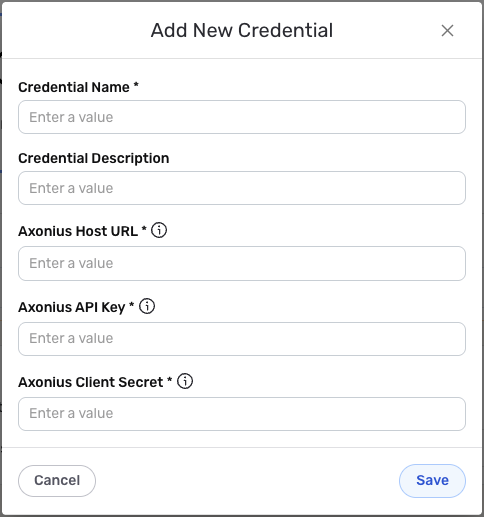
- Create a new data flow and select the Axonius connector. Under the Configure section in the data source configuration screen, click the Add Credential tile to open the Add New Credential overlay.
New Credential Overlay – Axonius
-
Enter a name for the credential in the Credential Name field and a short, meaningful description in the Credential Description field.
-
Enter the base URL for your Axonius instance in the Axonius Host URL field. This should be the complete URL including the protocol (https://) and your Axonius instance domain (e.g.,
https://your-instance.axonius.comorhttps://axonius.yourdomain.com). -
Enter the API key obtained from your Axonius instance in the Axonius API Key field. This unique identifier is used for API authentication.
-
Enter the client secret obtained from your Axonius instance in the Axonius Client Secret field. This confidential key is used together with the API key for authentication.
The API key and client secret are sensitive information that should be kept secure. Nexla will store these credentials securely and use them only for API authentication purposes. Both credentials are sent as custom headers (
api-keyandapi-secret) with each API request, and all requests use JSON content type. This authentication configuration is automatically managed by Nexla. -
Once all of the relevant steps have been completed, click the Save button at the bottom of the overlay to save the configured credential. The newly added credential will now appear in a tile on the Authenticate screen during data source/destination creation and can be selected for use with a new data source or destination.