The Finnworlds connector enables you to ingest structured financial market data — including bonds, dividends, stock splits, candlestick (OHLC) data, macroeconomic calendars, indicators, commodities, benchmarks, forex rates, stocks, earnings, ETF holdings, financial ratios, income statements, balance sheets, cash flows, insider transactions, SEC filings, technical indicators, and analyst ratings — directly into Nexla data flows. Follow the instructions below to create a new data flow that ingests data from a Finnworlds source in Nexla.
Create a New Data Flow
-
To create a new data flow, navigate to the Integrate section, and click the New Data Flow button. Then, select the desired flow type from the list, and click the Create button.
-
Select the Finnworlds connector tile from the list of available connectors. Then, select the credential that will be used to connect to the Finnworlds API, and click Next; or, create a new Finnworlds credential for use in this flow.
-
In Nexla, Finnworlds data sources can be created using pre-built endpoint templates, which expedite source setup for common Finnworlds endpoints. Each template is designed specifically for the corresponding Finnworlds API endpoint, making source configuration easy and efficient.
• To configure this source using a template, follow the instructions in Configure Using a Template.
Finnworlds sources can also be configured manually, allowing you to ingest data from Finnworlds endpoints not included in the pre-built templates or to apply further customizations to exactly suit your needs.
• To configure this source manually, follow the instructions in Configure Manually.
Nexla provides pre-built templates that can be used to rapidly configure data sources to ingest data from common Finnworlds API endpoints. Each template is designed specifically for the corresponding Finnworlds endpoint, making data source setup easy and efficient.
Endpoint Settings
- Select the endpoint from which this source will fetch data from the Endpoint pulldown menu. Available endpoint templates are listed in the expandable boxes below. Click on an endpoint to see more information about it and how to configure your data source for that endpoint.
List Bonds
This endpoint retrieves a list of bond data including pricing, yields, and maturity information. Use this endpoint to access fixed-income market data for analysis, portfolio management, or benchmarking against interest rate movements.
- This endpoint does not require any additional parameters beyond your API key credential. Select the List Bonds template, and the source will automatically call the Finnworlds bonds endpoint to retrieve available bond data.
- The response includes fields such as bond name, ISIN, coupon rate, maturity date, current price, and yield-to-maturity, enabling comprehensive fixed-income analysis.
List Dividends
This endpoint returns a list of dividend payment records including amounts, payment dates, ex-dividend dates, and the associated securities. Use this endpoint to track dividend income, perform yield analysis, or build dividend-focused screeners and alerts.
- Select the List Dividends template to fetch dividend records from the Finnworlds API. No additional parameters are required beyond the credential.
- The response data is extracted from the
dividends array within the API result, providing a record-per-dividend structure that maps cleanly to downstream analytics tools.
List Stock Splits
This endpoint returns a list of stock split events, including the split ratio, effective date, and the affected security. Use this endpoint to adjust historical price data for split-adjusted calculations or to maintain corporate action records.
- Select the List Stock Splits template to fetch stock split records. No additional configuration is required beyond selecting the template.
- The response data is extracted from the
stocksplits array within the API result, with each record representing a single split event.
List Historical Candlestick Data
This endpoint returns historical OHLC (open, high, low, close) candlestick data for securities, along with trading volume. Use this endpoint for technical analysis, price charting, backtesting trading strategies, or building financial models that require historical price series.
- Select the List Historical Candlestick Data template to retrieve daily OHLC records. No additional parameters are required beyond the credential when using the template.
- The response data is extracted from the
daily_stock_data array within the API result, with each record representing one trading day's price data for a given security. - Fields typically include the ticker symbol, date, open price, high price, low price, close price, and volume.
List Macroeconomic Calendar
This endpoint returns a list of upcoming and recent macroeconomic events, including scheduled release dates, consensus forecasts, prior values, and actual reported values. Use this endpoint to build economic event trackers, automate alerts for high-impact releases, or correlate market movements with economic data points.
- Select the List Macroeconomic Calendar template to fetch macroeconomic event records. No additional parameters are required beyond the credential.
- The response includes fields such as event name, country, release date, forecast value, prior value, and actual value (when available).
List Macroeconomic Indicators
This endpoint returns a list of macroeconomic indicator readings, including economic metrics such as GDP, inflation, unemployment, and interest rates, along with their values and reporting periods. Use this endpoint for country-level economic analysis, macro trend modeling, or enriching financial datasets with economic context.
- Select the List Macroeconomic Indicators template to fetch macroeconomic indicator records. No additional parameters are required beyond the credential.
- Each record in the response represents a single indicator reading for a specific country and time period.
List Commodities
This endpoint returns commodity market data including prices, contract specifications, and market information for energy, metals, agricultural products, and other commodity classes. Use this endpoint to monitor commodity price trends, build commodity dashboards, or integrate raw material pricing into financial models.
- Select the List Commodities template to fetch commodity records. No additional parameters are required beyond the credential.
- Each record in the response represents a single commodity and includes fields such as commodity name, price, unit, and date.
List Benchmarks
This endpoint returns a list of benchmark indices and their performance metrics, enabling comparative analysis of portfolio or security performance against standard market benchmarks. Use this endpoint to power performance attribution, risk-adjusted return calculations, or benchmark tracking dashboards.
- Select the List Benchmarks template to fetch benchmark index records. No additional parameters are required beyond the credential.
- Each record in the response represents a benchmark index and includes performance metrics such as index level, daily return, and historical values.
List Forex
This endpoint retrieves foreign exchange (forex) currency pair rates. Use this endpoint to access live or historical exchange rate data for currency conversion, international financial reporting, or FX risk management workflows.
- Select the List Forex template to fetch currency pair rate records. No additional parameters are required beyond the credential.
- Each record in the response represents a currency pair and includes the exchange rate and associated metadata.
List Indices
This endpoint retrieves market index levels and compositions, providing data on major stock market indices including their constituent weights and performance. Use this endpoint to analyze index-level market trends, build index tracking dashboards, or support passive investment strategy research.
- Select the List Indices template to fetch market index records. No additional parameters are required beyond the credential.
- Each record in the response represents an index level reading and includes index name, value, and date information.
List Stocks
This endpoint retrieves real-time or delayed equity and stock quote data. Use this endpoint to power equity screeners, monitor watchlists, or supply current price data to trading applications and financial dashboards.
- Select the List Stocks template to fetch equity quote records. No additional parameters are required beyond the credential.
- Each record in the response represents a stock quote and may include fields such as ticker symbol, current price, change, percentage change, and market capitalization.
List Earnings
This endpoint retrieves corporate earnings announcements and earnings-per-share (EPS) data. Use this endpoint to track earnings surprises, build earnings calendars, or enrich stock analysis with fundamental performance metrics.
- Select the List Earnings template to fetch earnings records. No additional parameters are required beyond the credential.
- Each record in the response represents an earnings event and includes fields such as company name, ticker, reported EPS, estimated EPS, revenue, and announcement date.
List Google Trends
This endpoint retrieves Google search volume trends and related stock data, enabling assessment of retail investor sentiment based on search activity. Use this endpoint to correlate search interest with stock price movements, identify emerging retail interest in specific securities, or build sentiment-based trading signals.
- Select the List Google Trends template to fetch search trend records. No additional parameters are required beyond the credential.
- Each record in the response represents a data point linking a search trend to an associated security, including search volume and related stock information.
List Market Exchanges
This endpoint retrieves a comprehensive list of all stock markets and securities trading exchanges, including MIC codes, exchange names, countries of operation, and status information. Use this endpoint to build exchange reference data, enrich security records with exchange metadata, or support compliance and reporting workflows.
- Select the List Market Exchanges template to fetch exchange records. No additional parameters are required beyond the credential.
- Each record in the response represents a single trading exchange and includes fields such as MIC code, exchange name, country, and active status.
List Real-Time Prices
This endpoint retrieves current and real-time stock prices, price change details, and the last traded timestamp for any ticker. Use this endpoint to power live price feeds, alert systems, or any application that requires the most recent price available for a given security.
- Select the List Real-Time Prices template to fetch current price records. No additional parameters are required beyond the credential.
- Each record in the response represents the latest price data for a security and includes the current price, price change, percentage change, and last traded timestamp.
List Analyst Ratings
This endpoint retrieves the latest and historical buy, sell, and hold consensus ratings, as well as price targets from analysts covering a stock. Use this endpoint to build analyst sentiment dashboards, track changes in consensus ratings over time, or incorporate Wall Street opinions into investment research workflows.
- Select the List Analyst Ratings template to fetch analyst rating records. No additional parameters are required beyond the credential.
- The response data is extracted from the
analysts array within the API result. Each record represents an analyst's rating for a given stock and includes fields such as analyst name, firm, rating, price target, and date.
List Balance Sheets
This endpoint retrieves balance sheet data — assets, liabilities, and equity — for publicly traded companies. Use this endpoint to analyze a company's financial position, calculate solvency and liquidity ratios, or build fundamental analysis workflows that require structured financial statement data.
- Select the List Balance Sheets template to fetch balance sheet records. No additional parameters are required beyond the credential.
- Each record in the response represents a balance sheet filing period for a company and includes line items such as total assets, total liabilities, stockholders' equity, and reporting date.
List Cash Flows
This endpoint retrieves cash flow statement data for publicly traded companies, covering operating, investing, and financing activities. Use this endpoint to assess a company's liquidity and cash generation, support free cash flow modeling, or enrich fundamental research with standardized cash flow data.
- Select the List Cash Flows template to fetch cash flow statement records. No additional parameters are required beyond the credential.
- Each record in the response represents a reporting period for a company and includes line items such as operating cash flow, capital expenditures, free cash flow, and financing activities.
List ETF Holdings
This endpoint retrieves current and historical ETF holdings and constituent weights for any ETF ticker. Use this endpoint to analyze ETF portfolio composition, track changes in holdings over time, or build ETF screening and comparison tools.
- Select the List ETF Holdings template to fetch ETF holding records. No additional parameters are required beyond the credential.
- Each record in the response represents a holding within an ETF and includes the security name, ticker, weighting percentage, number of shares held, and reporting date.
List Financial Ratios
This endpoint retrieves 200+ financial ratios — including P/E ratio, EV/EBITDA, quick ratio, debt-to-equity, and many more — for publicly traded companies. Use this endpoint to accelerate fundamental analysis, build custom valuation models, or populate financial screening tools with standardized ratio data.
- Select the List Financial Ratios template to fetch financial ratio records. No additional parameters are required beyond the credential.
- Each record in the response represents a company's ratio snapshot for a given period and includes a broad set of valuation, profitability, liquidity, and leverage metrics.
List Income Statements
This endpoint retrieves historical and current income statement data for publicly traded companies, covering revenue, expenses, and net income. Use this endpoint to analyze profitability trends, build earnings models, or integrate structured P&L data into financial research and reporting pipelines.
- Select the List Income Statements template to fetch income statement records. No additional parameters are required beyond the credential.
- Each record in the response represents an income statement for a specific reporting period and includes line items such as total revenue, gross profit, operating income, net income, and EPS.
List Insider Transactions
This endpoint retrieves insider transactions filed with the SEC, including trade dates, security types, and ownership changes for corporate insiders. Use this endpoint to monitor insider buying and selling activity, identify potential signals of management confidence or concern, or support regulatory compliance research.
- Select the List Insider Transactions template to fetch insider transaction records. No additional parameters are required beyond the credential.
- Each record in the response represents a single insider transaction and includes the insider's name, role, transaction type (buy/sell), number of shares, transaction price, and filing date.
List SEC Filings
This endpoint retrieves SEC filing metadata and extracts segments from full regulatory reports, including 10-K annual reports, 10-Q quarterly reports, 8-K current reports, and more. Use this endpoint to build document retrieval pipelines, automate regulatory research workflows, or enrich company data with structured filing records.
- Select the List SEC Filings template to fetch SEC filing records. No additional parameters are required beyond the credential.
- Each record in the response represents a filing submission and includes metadata such as company name, CIK number, filing type, filing date, and a reference to the filing document.
List Technical Indicators
This endpoint retrieves 50+ technical indicators — including RSI, MACD, Bollinger Bands, moving averages, and more — calculated on historical candlestick data across multiple timeframes. Use this endpoint to power technical analysis dashboards, build algorithmic trading signals, or supply pre-calculated indicators to quantitative research pipelines.
- Select the List Technical Indicators template to fetch technical indicator records. No additional parameters are required beyond the credential.
- Each record in the response represents a set of indicator values for a specific security and timeframe, enabling direct use in charting or signal generation without manual calculation.
Endpoint Testing
Once the selected endpoint template has been configured, Nexla can retrieve a sample of the data that will be fetched according to the current settings. This allows users to verify that the source is configured correctly before saving.
-
To test the current endpoint configuration, click the Test button to the right of the endpoint selection menu. Sample data will be fetched and displayed in the Endpoint Test Result panel on the right.
-
If the sample data is not as expected, review the selected endpoint and associated settings, and make any necessary adjustments. Then, click the Test button again, and check the sample data to ensure that the correct information is displayed.
Finnworlds data sources can be manually configured to ingest data from any valid Finnworlds REST API endpoint. Manual configuration provides maximum flexibility for accessing endpoints not covered by pre-built templates or when you need custom API configurations, such as applying query parameters to filter by ticker symbol, date range, or other supported fields.
With manual configuration, you can also create more complex Finnworlds sources, such as sources that use chained API calls to fetch data from multiple endpoints, or sources that require custom request parameters beyond the defaults provided by the endpoint templates.
API Method
-
To manually configure this source, select the Advanced tab at the top of the configuration screen.
-
Select the API method that will be used for calls to the Finnworlds API from the Method pulldown menu. Finnworlds endpoints use the GET method for all data retrieval operations:
- GET: For retrieving data from any Finnworlds endpoint.
API Endpoint URL
-
Enter the URL of the Finnworlds API endpoint from which this source will fetch data in the Set API URL field. Finnworlds API endpoints follow the pattern https://api.finnworlds.com/api/v1/{endpoint}. Your API key is handled automatically by Nexla using the credential you selected — you do not need to include it manually in the URL.
Common Finnworlds endpoint URLs include:
- Bonds:
https://api.finnworlds.com/api/v1/bonds
- Dividends:
https://api.finnworlds.com/api/v1/dividends
- Stock Splits:
https://api.finnworlds.com/api/v1/stocksplits
- Historical Candlestick:
https://api.finnworlds.com/api/v1/historicalcandlestick
- Macroeconomic Calendar:
https://api.finnworlds.com/api/v1/macrocalendar
- Macroeconomic Indicators:
https://api.finnworlds.com/api/v1/macroindicator
- Commodities:
https://api.finnworlds.com/api/v1/commodities
- Benchmarks:
https://api.finnworlds.com/api/v1/benchmark
- Forex:
https://api.finnworlds.com/api/v1/forex
- Indices:
https://api.finnworlds.com/api/v1/indices
- Stocks:
https://api.finnworlds.com/api/v1/stocks
- Earnings:
https://api.finnworlds.com/api/v1/earnings
- Real-Time Prices:
https://api.finnworlds.com/api/v1/realtimeprice
- Analyst Ratings:
https://api.finnworlds.com/api/v1/analystratings
- Balance Sheets:
https://api.finnworlds.com/api/v1/balancesheet
- Cash Flows:
https://api.finnworlds.com/api/v1/cashflow
- ETF Holdings:
https://api.finnworlds.com/api/v1/etfholdings
- Financial Ratios:
https://api.finnworlds.com/api/v1/financialratios
- Income Statements:
https://api.finnworlds.com/api/v1/incomestatement
- Insider Transactions:
https://api.finnworlds.com/api/v1/insidertransactions
- SEC Filings:
https://api.finnworlds.com/api/v1/secfilings
- Technical Indicators:
https://api.finnworlds.com/api/v1/technicalindicators
- Google Trends:
https://api.finnworlds.com/api/v1/googletrends
- Market Exchanges:
https://api.finnworlds.com/api/v1/marketexchanges
Ensure the API endpoint URL is correct and accessible with your current credentials. You can test the endpoint using the Test button after configuring the URL. For a complete list of available endpoints and supported query parameters, refer to the Finnworlds API documentation.
Date/Time Macros (API URL)
Optional
Optionally, the API URL can be customized using macros—all macros added to the API URL will be converted into values when Nexla executes the API call. Macros are dynamic placeholders that allow you to create flexible API endpoints that can adapt to different time periods or data requirements. This is particularly useful when filtering Finnworlds endpoints by date ranges, such as retrieving dividends or candlestick data for a specific period.
Macros are particularly useful for Finnworlds endpoints that support date-range query parameters (such as date_from and date_to), allowing your data flow to automatically retrieve data for the current or a relative time period on each run.
-
To add a macro, type { at the appropriate position in the API URL (within the Set API URL field), and select the desired macro from the dropdown list.
{now} – The current datetime{now-1} – The datetime one time unit before the current datetime{now+1} – The datetime one time unit after the current datetimecustom – Datetime macros can reference any number of time units before or after the current datetime—for example, enter (now-4) to indicate the datetime four time units before the current datetime
-
Select the format that will be applied to datetime macros from the Date Format for Date/Time Macro pulldown menu. This format will be applied to the base datetime value of the macro—i.e., the value of {now} in {now-1}. Finnworlds date parameters typically use yyyy-MM-dd format.
-
Select the datetime unit that will be used to perform mathematical operations in the included macro(s) from the Time Unit for Operations pulldown menu—for example, for the macro {now-1}, when Day is selected, {now-1} will be converted to the datetime one day before the current datetime.
Lookup-Based Macros (API URL)
Optional
Column values from existing lookups can also be included as macros in the API URL. Lookup-based macros allow you to reference data from previously configured data sources or lookups, enabling dynamic API endpoints that adapt based on existing data.
Lookup-based macros are useful when you need to filter Finnworlds endpoints by specific values — such as a list of ticker symbols or company identifiers — that are maintained in another Nexla data source or lookup table.
-
To include a lookup column value macro, select the relevant lookup from the Add Lookups to Supported Macros pulldown menu.
-
Type { at the appropriate position in the API URL, and select the lookup column-based macro from the dropdown list. Lookup-based macros are automatically populated into the macro list when a lookup is selected in the Add Lookups to Supported Macros pulldown menu.
If only a subset of the data returned by the Finnworlds API endpoint is needed, you can designate the part of the response that should be included in the Nexset(s) produced from this source by specifying the path to the relevant data within the response. Finnworlds API responses always return data nested within a result.output structure, so specifying the correct path is important for proper record extraction.
For example, the bonds endpoint returns a JSON response where the relevant records are located at $.result.output[*], while the dividends endpoint stores records at $.result.output.dividends[*]. By entering the appropriate path, you configure Nexla to treat each element of the returned array as an individual record.
Specifying the correct path to data is essential when working with Finnworlds endpoints manually. Without it, Nexla may treat the entire response object as a single record rather than extracting individual records from the nested array.
Autogenerate Path Suggestions
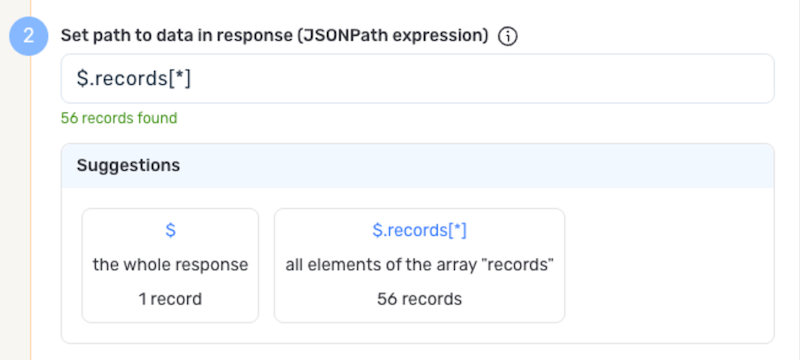
Nexla can also autogenerate data path suggestions based on the response from the API endpoint. These suggested paths can be used as-is or modified to exactly suit your needs.
-
To use this feature, click the Test button next to the Set API URL field to fetch a sample response from the API endpoint. Suggested data paths generated based on the content and format of the response will be displayed in the Suggestions box below the Set Path to Data in Response field.
-
Click on a suggestion to automatically populate the Set Path to Data in Response field with the corresponding path. The populated path can be modified directly within the field if further customization is needed.
If metadata is included in the Finnworlds response but is located outside of the defined path to relevant data, you can configure Nexla to include this data as common metadata in each record. This is useful when you want to preserve contextual information from the API response — such as request timestamps or summary statistics — alongside each data record.
Finnworlds responses typically wrap data in a result object that may contain metadata alongside the output array. If you need to preserve fields from the result level alongside each record, use the metadata path to reference that location.
-
If Nexla should include any additional request headers in API calls to this source, enter the headers and corresponding values as comma-separated pairs in the Request Headers field (e.g., header1:value1,header2:value2). Finnworlds endpoints typically do not require custom headers beyond what is included in the credential, but headers can be added for API versioning or content type specifications if needed.
You do not need to include an Authorization or API key header — Nexla automatically appends the key query parameter to all requests using the credential you configured. Common headers like Content-Type are handled automatically.
Endpoint Testing
After configuring all settings for the selected endpoint, Nexla can retrieve a sample of the data that will be fetched according to the current configuration. This allows users to verify that the source is configured correctly before saving.
-
To test the current endpoint configuration, click the Test button to the right of the endpoint selection menu. Sample data will be fetched and displayed in the Endpoint Test Result panel on the right.
-
If the sample data is not as expected, review the selected endpoint and associated settings, and make any necessary adjustments. Then, click the Test button again, and check the sample data to ensure that the correct information is displayed.
Save & Activate the Source
- Once all of the relevant steps in the above sections have been completed, click the Create button in the upper right corner of the screen to save and create the new Finnworlds data source. Nexla will now begin ingesting data from the configured endpoint and will organize any data that it finds into one or more Nexsets.