Authorization

Extole
Prerequisites
Before creating an Extole credential, you need to obtain your Client Domain from your Extole account. The Client Domain is required to authenticate with the Extole API.
To obtain your Client Domain, you need to have an Extole account with API access enabled. Once you have access to your account, you can find your Client Domain from your Extole account settings or from your Extole URL. The Client Domain is your Extole client domain (e.g., yourcompany for yourcompany.extole.io). Nexla uses token-based authentication to automatically obtain an access token for API requests. The access token is then sent in the Authorization header with the Bearer prefix for all API requests to the Extole API. For detailed information about API credential setup and authentication, refer to the Extole API documentation.
Create an Extole Credential
- To create a new Extole credential, after selecting the data source/destination type, click the Add Credential tile to open the Add New Credential overlay.
New Credential Overlay – Extole
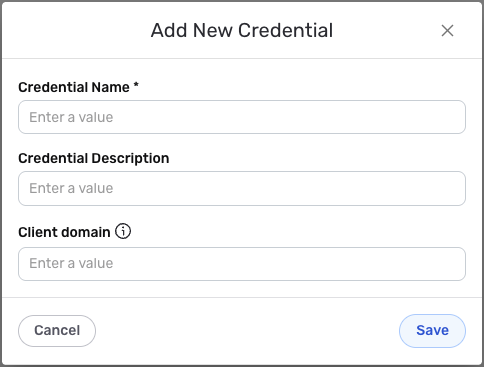
Credential Name & Description
-
Enter a name for the credential in the Credential Name field and a short, meaningful description in the Credential Description field.
Resource descriptions are recommended but are not required. They should be used provide information about the resource purpose, data freshness, etc. that can help the owner and other users efficiently understand and utilize the resource.
Client Domain
-
Enter your Extole Client Domain in the Client domain field. This is your Extole client domain (e.g.,
yourcompanyforyourcompany.extole.io). The Client Domain is used to construct the API base URL for your account (e.g.,https://{client_domain}.extole.io/api/v4).The Client Domain is your Extole client domain without the
.extole.iosuffix. For example, if your Extole URL ishttps://yourcompany.extole.io, your Client Domain would beyourcompany. The Client Domain is used to construct the API base URL for your account. Nexla uses token-based authentication to automatically obtain an access token for API requests. For detailed information about finding your Client Domain and authentication, see the Extole API documentation.
Save the Credential
-
Once all of the relevant steps in the above sections have been completed, click the Save button at the bottom of the overlay to save the configured credential.
-
The newly added credential will now appear in a tile on the Authenticate screen during data source/destination creation and can be selected for use with a new data source or destination.