eBay Fulfillment API Data Source

eBay Fulfillment API
Create a New Data Flow
-
To create a new data flow, navigate to the Integrate section, and click the New Data Flow button. Then, select the desired flow type from the list, and click the Create button.
-
Select the eBay Fulfillment API connector tile from the list of available connectors. Then, select the credential that will be used to connect to the eBay Fulfillment API instance, and click Next; or, create a new eBay Fulfillment API credential for use in this flow.
-
In Nexla, eBay Fulfillment API data sources can be created using pre-built endpoint templates, which expedite source setup for common eBay Fulfillment API endpoints. Each template is designed specifically for the corresponding eBay Fulfillment API endpoint, making source configuration easy and efficient.
• To configure this source using a template, follow the instructions in Configure Using a Template.eBay Fulfillment API sources can also be configured manually, allowing you to ingest data from eBay Fulfillment API endpoints not included in the pre-built templates or apply further customizations to exactly suit your needs.
• To configure this source manually, follow the instructions in Configure Manually.
Configure Using a Template
Nexla provides pre-built templates that can be used to rapidly configure data sources to ingest data from common eBay Fulfillment API endpoints. Each template is designed specifically for the corresponding eBay Fulfillment API endpoint, making data source setup easy and efficient.
Endpoint Settings
- Select the endpoint from which this source will fetch data from the Endpoint pulldown menu. Available endpoint templates are listed in the expandable boxes below. Click on an endpoint to see more information about it and how to configure your data source for this endpoint.
Endpoint Testing
Once the selected endpoint template has been configured, Nexla can retrieve a sample of the data that will be fetched according to the current settings. This allows users to verify that the source is configured correctly before saving.
-
To test the current endpoint configuration, click the Test button to the right of the endpoint selection menu. Sample data will be fetched & displayed in the Endpoint Test Result panel on the right.
-
If the sample data is not as expected, review the selected endpoint and associated settings, and make any necessary adjustments. Then, click the Test button again, and check the sample data to ensure that the correct information is displayed.
Configure Manually
eBay Fulfillment API data sources can be manually configured to ingest data from any valid eBay Fulfillment API endpoint. Manual configuration provides maximum flexibility for accessing endpoints not covered by pre-built templates or when you need custom API configurations.
With manual configuration, you can also create more complex eBay Fulfillment API sources, such as sources that use chained API calls to fetch data from multiple endpoints or sources that require custom request parameters.
API Method
-
To manually configure this source, select the Advanced tab at the top of the configuration screen.
-
Select the API method that will be used for calls to the eBay Fulfillment API from the Method pulldown menu. The most common methods are:
- GET: For retrieving data from the API, such as orders, fulfillments, and payment disputes.
- POST: For sending data to the API or triggering actions (typically used for destination operations).
API Endpoint URL
- Enter the URL of the eBay Fulfillment API endpoint from which this source will fetch data in the Set API URL field. This should be the complete URL including the protocol (
https://) and any required path parameters.
eBay Fulfillment API endpoints follow the base URL pattern https://api.ebay.com/sell/fulfillment/v1/ for Production (or https://apiz.ebay.com/sell/fulfillment/v1/ for Sandbox), followed by the resource path. For example, to retrieve all orders, use https://api.ebay.com/sell/fulfillment/v1/order. The eBay Fulfillment API enforces OAuth token-based authentication—ensure the correct credential is selected for this source.
Date/Time Macros (API URL)
Optionally, the API URL can be customized using macros—all macros added to the API URL will be converted into values when Nexla executes the API call. Macros are dynamic placeholders that allow you to create flexible API endpoints that can adapt to different time periods or data requirements.
Date/time macros are particularly useful for the eBay Fulfillment API's filter parameters, such as filtering orders by creationdate or lastmodifieddate to retrieve only recently created or updated records on each run.
-
To add a macro, type
{at the appropriate position in the API URL (within the Set API URL field), and select the desired macro from the dropdown list.{now}– The current datetime{now-1}– The datetime one time unit before the current datetime{now+1}– The datetime one time unit after the current datetimecustom– Datetime macros can reference any number of time units before or after the current datetime—for example, enter(now-4)to indicate the datetime four time units before the current datetime
-
Select the format that will be applied to datetime macros from the Date Format for Date/Time Macro pulldown menu. This format will be applied to the base datetime value of the macro—i.e., the value of
{now}in{now-1}. -
Select the datetime unit that will be used to perform mathematical operations in the included macro(s) from the Time Unit for Operations pulldown menu—for example, for the macro
{now-1}, whenDayis selected,{now-1}will be converted to the datetime one day before the current datetime.
Lookup-Based Macros (API URL)
Column values from existing lookups can also be included as macros in the API URL. Lookup-based macros allow you to reference data from previously configured data sources or lookups, enabling dynamic API endpoints that can adapt based on existing data.
Lookup-based macros are useful when you need to create eBay Fulfillment API endpoints that reference specific order IDs, dispute IDs, or other identifiers pulled from another Nexla data source.
-
To include a lookup column value macro, select the relevant lookup from the Add Lookups to Supported Macros pulldown menu.
-
Type
{at the appropriate position in the API URL, and select the lookup column-based macro from the dropdown list. Lookup-based macros are automatically populated into the macro list when a lookup is selected in the Add Lookups to Supported Macros pulldown menu.
Path to Data
If only a subset of the data that will be returned by the API endpoint is needed, you can designate the part(s) of the response that should be included in the Nexset(s) produced from this source by specifying the path to the relevant data within the response.
For example, the eBay Fulfillment API getOrders endpoint returns an orders array along with pagination metadata. By entering the path $.orders[*], you can configure Nexla to treat each order object as a separate record.
Path to Data is essential when eBay API responses have nested structures. Without specifying the correct path, Nexla might treat the entire response object (including pagination fields) as a single record instead of extracting the individual order, fulfillment, or dispute records.
-
To specify which data should be treated as relevant in responses from this source, enter the path to the relevant data in the Set Path to Data in Response field.
- For responses in JSON format enter the JSON path that points to the object or array that should be treated as relevant data. JSON paths use dot notation (e.g.,
$.orders[*]to access the orders array,$.fulfillments[*]for shipping fulfillments, or$.paymentDisputeSummaries[*]for dispute summaries).
Path to Data Example:If the API response from
getOrdersreturns a JSON object with a top-level array namedorders, enter the path as$.orders[*]so that each element of the array is treated as an individual order record. - For responses in JSON format enter the JSON path that points to the object or array that should be treated as relevant data. JSON paths use dot notation (e.g.,
Autogenerate Path Suggestions
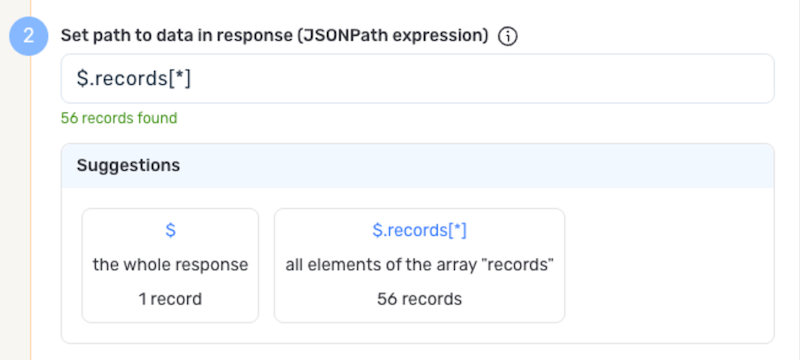
Nexla can also autogenerate data path suggestions based on the response from the API endpoint. These suggested paths can be used as-is or modified to exactly suit your needs.
-
To use this feature, click the Test button next to the Set API URL field to fetch a sample response from the API endpoint. Suggested data paths generated based on the content & format of the response will be displayed in the Suggestions box below the Set Path to Data in Response field.
-
Click on a suggestion to automatically populate the Set Path to Data in Response field with the corresponding path. The populated path can be modified directly within the field if further customization is needed.
Metadata
If metadata is included in the response but is located outside of the defined path to relevant data, you can configure Nexla to include this data as common metadata in each record. This is useful when you want to preserve important contextual information that applies to all records but isn't part of the main data array.
For example, an eBay getOrders response includes total (total number of matching orders) and limit fields alongside the orders array. You can preserve these fields as metadata on each record by specifying their path.
Metadata paths are particularly useful for preserving eBay API response context like total record counts, pagination offsets, or request timestamps that apply to all records in the response.
-
To specify the location of metadata that should be included with each record, enter the path to the relevant metadata in the Path to Metadata in Response field.
- For responses in JSON format, enter the JSON path to the object or array that contains the metadata.
Request Headers
-
If Nexla should include any additional request headers in API calls to this source, enter the headers & corresponding values as comma-separated pairs in the Request Headers field (e.g.,
header1:value1,header2:value2).You do not need to include any headers already present in the credentials. The eBay Fulfillment API's OAuth authorization header is automatically handled by Nexla based on your credential configuration. You may need to include the
X-EBAY-C-MARKETPLACE-IDheader for marketplace-specific requests (e.g.,X-EBAY-C-MARKETPLACE-ID:EBAY_US).
Endpoint Testing
After configuring all settings for the selected endpoint, Nexla can retrieve a sample of the data that will be fetched according to the current configuration. This allows users to verify that the source is configured correctly before saving.
-
To test the current endpoint configuration, click the Test button to the right of the endpoint selection menu. Sample data will be fetched & displayed in the Endpoint Test Result panel on the right.
-
If the sample data is not as expected, review the selected endpoint and associated settings, and make any necessary adjustments. Then, click the Test button again, and check the sample data to ensure that the correct information is displayed.
Save & Activate the Source
- Once all of the relevant steps in the above sections have been completed, click the Create button in the upper right corner of the screen to save and create the new eBay Fulfillment API data source. Nexla will now begin ingesting data from the configured endpoint and will organize any data that it finds into one or more Nexsets.