Data Source

GoCardless API
Create a New Data Flow
-
To create a new data flow, navigate to the Integrate section, and click the New Data Flow button. Then, select the desired flow type from the list, and click the Create button.
-
Select the GoCardless API connector tile from the list of available connectors. Then, select the credential that will be used to connect to GoCardless, and click Next; or, create a new GoCardless API credential for use in this flow.
-
In Nexla, GoCardless API data sources can be created using pre-built endpoint templates, which expedite source setup for common GoCardless API endpoints. Each template is designed specifically for the corresponding GoCardless API endpoint, making data source setup easy and efficient.
• To configure this source using a template, follow the instructions in Configure Using a Template.GoCardless API sources can also be configured manually, allowing you to ingest data from GoCardless API endpoints not included in the pre-built templates or apply further customizations to exactly suit your needs.
• To configure this source manually, follow the instructions in Configure Manually.
Configure Using a Template
Nexla provides pre-built templates that can be used to rapidly configure data sources to ingest data from common GoCardless API endpoints. Each template is designed specifically for the corresponding GoCardless API endpoint, making data source setup easy and efficient.
Endpoint Settings
-
Select the endpoint from which this source will fetch data from the Endpoint pulldown menu. Available endpoint templates are listed in the expandable boxes below. Click on an endpoint to see more information about it and how to configure your data source for this endpoint.
Endpoint Testing
Once the selected endpoint template has been configured, Nexla can retrieve a sample of the data that will be fetched according to the current settings. This allows users to verify that the source is configured correctly before saving.
-
To test the current endpoint configuration, click the Test button to the right of the endpoint selection menu. Sample data will be fetched & displayed in the Endpoint Test Result panel on the right.
-
If the sample data is not as expected, review the selected endpoint and associated settings, and make any necessary adjustments. Then, click the Test button again, and check the sample data to ensure that the correct information is displayed.
Configure Manually
GoCardless API sources can also be configured to ingest data from any valid GoCardless API endpoint. The GoCardless REST API base URL is https://api.gocardless.com for the live environment and https://api-sandbox.gocardless.com for sandbox. Common endpoints include resources such as payments, mandates, customers, subscriptions, payouts, refunds, and events.
First, select the method that will be used for calls to the GoCardless API from the Method pulldown menu. The most common method for data ingestion is:
- GET: For retrieving lists of resources or individual resource details from GoCardless.
- POST: For triggering actions or filtering list endpoints that require a request body (some GoCardless list endpoints accept filter parameters via POST).
API Endpoint URL
-
Enter the URL of the GoCardless API endpoint from which this source will fetch data in the Set API URL field. This should be the complete URL including the protocol (
https://) and any required path parameters.Some commonly used GoCardless API endpoints for data ingestion include:
https://api.gocardless.com/payments— List all payments with optional filters for status, mandate, customer, or date range.https://api.gocardless.com/mandates— List all mandates, optionally filtered by customer, customer bank account, or status.https://api.gocardless.com/customers— List all customers in your GoCardless account.https://api.gocardless.com/subscriptions— List all subscriptions, optionally filtered by mandate or customer.https://api.gocardless.com/payouts— List all payouts made to your bank account.https://api.gocardless.com/refunds— List all refunds issued.https://api.gocardless.com/events— List all events, useful for building audit trails or tracking status changes across all resource types.
GoCardless returns paginated responses. Most list endpoints return results nested under a key matching the resource type (for example,
payments,mandates,customers). Use the Path to Data field to extract just the resource array from each response.
Date/Time Macros (API URL)
Optionally, the API URL can be customized using macros — all macros added to the API URL will be converted into values when Nexla executes the API call. Macros are dynamic placeholders that allow you to create flexible API endpoints that adapt to different time periods or data requirements. This is particularly useful with GoCardless endpoints that support date-range filtering, such as created_at[gte] and created_at[lte] query parameters.
For example, to ingest only payments created within the last day, you could construct a URL such as https://api.gocardless.com/payments?created_at[gte]={'{now-1}'} using date/time macros.
-
To add a macro, type
{at the appropriate position in the API URL (within the Set API URL field), and select the desired macro from the dropdown list.{now}– The current datetime{now-1}– The datetime one time unit before the current datetime{now+1}– The datetime one time unit after the current datetimecustom– Datetime macros can reference any number of time units before or after the current datetime — for example, enter(now-7)to indicate the datetime seven time units before the current datetime
-
Select the format that will be applied to datetime macros from the Date Format for Date/Time Macro pulldown menu. This format will be applied to the base datetime value of the macro — i.e., the value of
{now}in{now-1}. -
Select the datetime unit that will be used to perform mathematical operations in the included macro(s) from the Time Unit for Operations pulldown menu — for example, for the macro
{now-1}, whenDayis selected,{now-1}will be converted to the datetime one day before the current datetime.
Lookup-Based Macros (API URL)
Column values from existing lookups can also be included as macros in the API URL. Lookup-based macros allow you to reference data from previously configured data sources or lookups, enabling dynamic API endpoints that adapt based on existing data. This is useful when you need to retrieve GoCardless records for specific customer IDs, mandate IDs, or payment IDs sourced from another Nexla dataset.
-
To include a lookup column value macro, select the relevant lookup from the Add Lookups to Supported Macros pulldown menu.
-
Type
{at the appropriate position in the API URL, and select the lookup column-based macro from the dropdown list. Lookup-based macros are automatically populated into the macro list when a lookup is selected in the Add Lookups to Supported Macros pulldown menu.
Path to Data
GoCardless API responses wrap resource arrays under a top-level key matching the resource name. For example, a request to /payments returns a response with the structure {"payments": [...], "meta": {...}}. By specifying the path to the relevant data, you instruct Nexla to treat each element of the resource array as a record rather than the entire response object.
Specifying the correct path to data is strongly recommended for GoCardless sources. Without it, Nexla will treat the entire response object (including pagination metadata) as a single record rather than ingesting each payment, mandate, or other resource as an individual record.
-
To specify which data should be treated as relevant in responses from this source, enter the path to the relevant data in the Set Path to Data in Response field.
- For the
/paymentsendpoint, enter$.payments[*]to extract each payment as a record. - For the
/mandatesendpoint, enter$.mandates[*]. - For the
/customersendpoint, enter$.customers[*]. - For the
/subscriptionsendpoint, enter$.subscriptions[*]. - For the
/eventsendpoint, enter$.events[*].
Path to Data Example:If fetching payments from
https://api.gocardless.com/payments, the API response includes a top-level array namedpaymentsthat contains the payment records. The path to the response should be entered as$.payments[*]. - For the
Autogenerate Path Suggestions
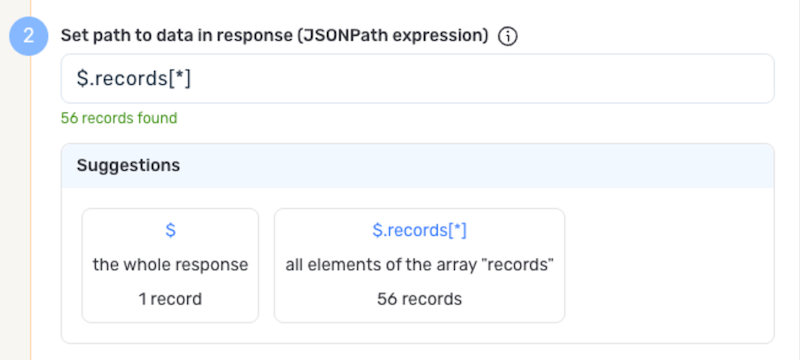
Nexla can also autogenerate data path suggestions based on the response from the API endpoint. These suggested paths can be used as-is or modified to exactly suit your needs.
-
To use this feature, click the Test button next to the Set API URL field to fetch a sample response from the GoCardless API endpoint. Suggested data paths generated based on the content and format of the response will be displayed in the Suggestions box below the Set Path to Data in Response field.
-
Click on a suggestion to automatically populate the Set Path to Data in Response field with the corresponding path. The populated path can be modified directly within the field if further customization is needed.
Metadata
If metadata is included in the response but is located outside of the defined path to relevant data, you can configure Nexla to include this data as common metadata in each record. GoCardless list responses include a meta object that contains pagination cursor information (cursors.before and cursors.after). This metadata can be useful for tracking pagination state or enriching records with response-level context.
-
To specify the location of metadata that should be included with each record, enter the path to the relevant metadata in the Path to Metadata in Response field.
- For GoCardless JSON responses, enter the JSON path to the object or array that contains the metadata (for example,
$.meta).
- For GoCardless JSON responses, enter the JSON path to the object or array that contains the metadata (for example,
Request Headers
-
If Nexla should include any additional request headers in API calls to this source, enter the headers and corresponding values as comma-separated pairs in the Request Headers field (e.g.,
header1:value1,header2:value2). Additional headers may be required for GoCardless API versioning — GoCardless recommends including aGoCardless-Versionheader to pin your integration to a specific API version and avoid breaking changes.You do not need to include the
Authorizationheader here, as it is handled automatically by Nexla based on your GoCardless credential configuration. Common headers to consider for GoCardless includeGoCardless-Version(e.g.,GoCardless-Version:2015-07-06) to specify the API version your integration targets.
Endpoint Testing
After configuring all settings for the selected endpoint, Nexla can retrieve a sample of the data that will be fetched according to the current configuration. This allows you to verify that the source is configured correctly before saving.
-
To test the current endpoint configuration, click the Test button to the right of the endpoint selection menu. Sample data will be fetched and displayed in the Endpoint Test Result panel on the right.
-
If the sample data is not as expected, review the selected endpoint and associated settings, and make any necessary adjustments. Then, click the Test button again, and check the sample data to ensure that the correct information is displayed.
Save & Activate the Source
- Once all of the relevant steps in the above sections have been completed, click the Create button in the upper right corner of the screen to save and create the new GoCardless API data source. Nexla will now begin ingesting data from the configured endpoint and will organize any data that it finds into one or more Nexsets.