Authorization

Intuit QuickBooks Sandbox
Prerequisites
Before creating an Intuit QuickBooks Sandbox credential, you need to have a QuickBooks Sandbox account. The credential uses the Nexla Sandbox App for OAuth2 authentication, which simplifies the setup process by using a pre-configured OAuth2 application managed by Nexla for the sandbox environment.
To use this credential, you need to have a QuickBooks Sandbox account. The QuickBooks Sandbox is a testing environment that provides a safe space to test integrations, API calls, and accounting workflows without affecting live financial data. Once you have access to your sandbox account, you can connect it to Nexla using the OAuth2 authorization flow. The Nexla Sandbox App handles the OAuth2 authentication process, so you do not need to create your own OAuth2 application. For detailed information about QuickBooks Sandbox API authentication and setup, refer to the QuickBooks API documentation.
Create an Intuit QuickBooks Sandbox Credential
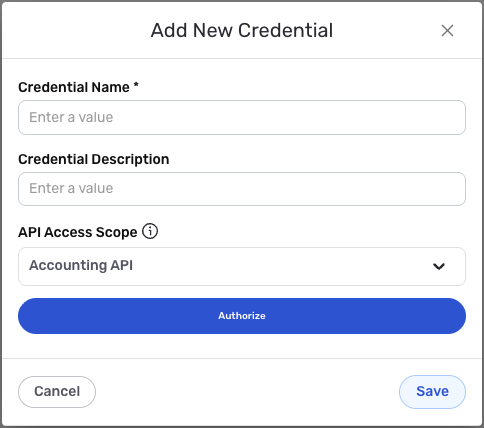
- To create a new Intuit QuickBooks Sandbox credential, after selecting the data source/destination type, click the Add Credential tile to open the Add New Credential overlay.
New Credential Overlay – Intuit QuickBooks Sandbox
Credential Name & Description
-
Enter a name for the credential in the Credential Name field and a short, meaningful description in the Credential Description field.
Resource descriptions are recommended but are not required. They should be used provide information about the resource purpose, data freshness, etc. that can help the owner and other users efficiently understand and utilize the resource.
OAuth2 Authentication
Intuit QuickBooks Sandbox uses OAuth2 authentication to securely access the QuickBooks Sandbox API. The credential uses the Nexla Sandbox App for OAuth2 authentication, which simplifies the setup process by using a pre-configured OAuth2 application managed by Nexla for the sandbox environment.
-
Select the API access scope from the API Access Scope dropdown menu. Available options include:
- Accounting API: Provides access to accounting-related data and operations (
com.intuit.quickbooks.accounting openid email profile). - Payments API: Provides access to payment-related data and operations (
com.intuit.quickbooks.payment openid email profile). - Accounting & Payments API: Provides access to both accounting and payment data and operations (
com.intuit.quickbooks.accounting com.intuit.quickbooks.payment openid email profile).
The default value is
com.intuit.quickbooks.accounting openid email profileif not specified. The selected scope determines what permissions are requested during the OAuth2 authorization flow. - Accounting API: Provides access to accounting-related data and operations (
-
Click the Authorize button to begin the OAuth2 authorization flow. This will redirect you to Intuit's authorization page where you will be asked to sign in with your QuickBooks Sandbox account and grant permissions to Nexla to access your QuickBooks Sandbox data.
During the OAuth2 authorization flow, you will be redirected to Intuit's authorization page. You must sign in with a QuickBooks Sandbox account that has access to the QuickBooks Sandbox company you want to connect. After signing in, you will be asked to grant permissions to Nexla to access your QuickBooks Sandbox data. The access scope you selected determines what permissions are requested. Once you grant permissions, you will be redirected back to Nexla, and the authorization will be completed automatically.
-
After completing the OAuth2 authorization flow, Nexla will automatically obtain and store the access token and refresh token needed to authenticate API requests. The access token is used to authenticate each API request, and the refresh token is used to obtain new access tokens when the current access token expires.
OAuth2 access tokens expire after a certain period for security reasons. Nexla automatically refreshes expired access tokens using the refresh token, so you typically do not need to re-authorize unless you revoke access or the refresh token expires. The access token is sent in the
Authorizationheader with theBearerprefix for all API requests to the QuickBooks Sandbox API. The QuickBooks Sandbox environment uses sandbox-specific API endpoints (e.g.,https://sandbox-quickbooks.api.intuit.com) which are separate from production endpoints. For detailed information about OAuth2 authentication, token management, and available scopes, see the QuickBooks API documentation.
Save the Credential
-
Once all of the relevant steps in the above sections have been completed, click the Save button at the bottom of the overlay to save the configured credential.
-
The newly added credential will now appear in a tile on the Authenticate screen during data source/destination creation and can be selected for use with a new data source or destination.