Authorization

Gong
Prerequisites
Before creating a Gong credential, you'll need to obtain API credentials (Access Key and Access Secret) from your Gong account. Gong provides API access through the Settings section of your Gong workspace, where you can generate API credentials for programmatic access to your revenue intelligence data.
To access the API settings in Gong:
-
Log in to your Gong account at
https://app.gong.ioor your organization's Gong instance. -
Navigate to Settings (typically accessible from the user menu or workspace settings).
-
In the Settings menu, locate and click on API or API Documentation to access the API configuration page.
-
On the API settings page, you'll find options to create or manage API credentials. Gong uses Access Key and Access Secret pairs for API authentication.
-
Click Create API Credentials or Generate Access Key to create a new set of credentials.
-
Copy the Access Key (username) and Access Secret (password) immediately, as the Access Secret may only be displayed once for security purposes.
-
Note the API version you'll be using (typically
v2for the current Gong API version).
For detailed information about Gong API authentication and credential management, refer to the Gong API Documentation.
Create a Gong Credential
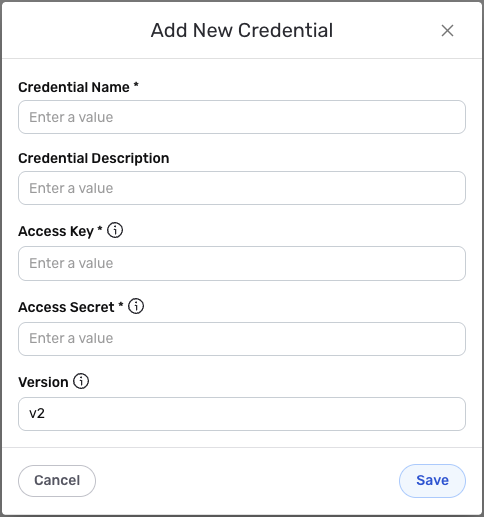
- To create a new Gong credential, after selecting the data source/destination type, click the Add Credential tile to open the Add New Credential overlay.
New Credential Overlay – Gong
Credential Name & Description
-
Enter a name for the credential in the Credential Name field and a short, meaningful description in the Credential Description field.
Resource descriptions are recommended but are not required. They should be used provide information about the resource purpose, data freshness, etc. that can help the owner and other users efficiently understand and utilize the resource.
Authentication Settings
-
In the Access Key field, enter the Access Key (username) that you obtained from your Gong API settings. This is the username component of your Gong API credentials.
-
In the Access Secret field, enter the Access Secret (password) that you obtained from your Gong API settings. This is the password component of your Gong API credentials used for Basic Authentication.
The Access Secret is sensitive information and should be kept secure. If you've lost your Access Secret, you'll need to generate a new set of API credentials in your Gong account settings.
-
In the Version field, enter the API version you want to use. The default value is
v2, which is the current version of the Gong API. You can specify a different version if your organization uses a specific API version.
Save the Credential
-
Once all of the relevant steps in the above sections have been completed, click the Save button at the bottom of the overlay to save the configured credential.
-
The newly added credential will now appear in a tile on the Authenticate screen during data source/destination creation and can be selected for use with a new data source or destination.