Authorization

Freshsales
Prerequisites
Before creating a Freshsales credential, you need to have a Freshsales account and obtain an API key from your Freshsales account settings. The API key is required to authenticate API requests to the Freshsales API.
To obtain your API key, follow these steps:
-
Sign in to your Freshsales account using your credentials.
-
Click your profile picture in the top-right corner of the screen and select Settings from the dropdown menu.
-
In the Settings page, click the API settings tab to access the API configuration section.
-
Your API key will be displayed in the field labeled Your API key. Click Copy to copy the API key to your clipboard, or you can manually copy it.
-
Store the API key securely, as you will need it to configure your Nexla credential. The API key provides access to your Freshsales account data, so treat it as sensitive information.
-
Note your Freshsales domain name, which is typically in the format
domain.freshsales.io. You can find your domain name in your Freshsales account URL (e.g., if your account URL ishttps://acme.freshsales.io, your domain isacme.freshsales.io). The domain name is used to construct API endpoint URLs for your specific Freshsales instance.
The API key is used to authenticate all API requests to Freshsales. The API key is sent in the Authorization header with the Token key and the API key as the value (e.g., Token: {api_key}). The Freshsales API provides access to various CRM resources including leads, contacts, deals, accounts, and users. For detailed information about obtaining API keys, API authentication, and available endpoints, refer to the Freshsales API documentation and Freshsales API key support article.
Create a Freshsales Credential
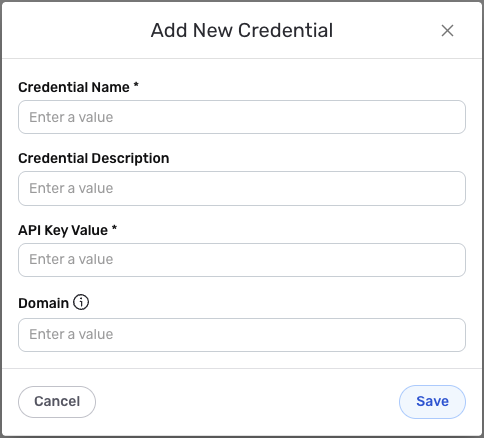
- To create a new Freshsales credential, after selecting the data source/destination type, click the Add Credential tile to open the Add New Credential overlay.
New Credential Overlay – Freshsales
Credential Name & Description
-
Enter a name for the credential in the Credential Name field and a short, meaningful description in the Credential Description field.
Resource descriptions are recommended but are not required. They should be used provide information about the resource purpose, data freshness, etc. that can help the owner and other users efficiently understand and utilize the resource.
API Key Authentication
Freshsales uses API key authentication for all API requests. The API key is sent in the request header to authenticate each API call.
-
Enter your Freshsales API key in the API Key Value field. This is the API key you obtained from your Freshsales account settings. The API key is required for all API requests and is used to authenticate your account.
-
Enter your Freshsales domain name in the Domain field. This should be your Freshsales domain name in the format
domain.freshsales.io. For example, if your Freshsales URL ishttps://acme.freshsales.io, you would enteracme.freshsales.ioin this field. The domain is used to construct the API endpoint URLs for your Freshsales instance.The domain name should not include the protocol (
https://) or any path components. Only enter the domain portion, such asacme.freshsales.io. The domain is used to construct API endpoint URLs in the formathttps://{domain}/api/{endpoint}. You can find your domain name in your Freshsales account URL or account settings. For detailed information about API endpoints and domain configuration, see the Freshsales API documentation.
Save the Credential
-
Once all of the relevant steps in the above sections have been completed, click the Save button at the bottom of the overlay to save the configured credential.
-
The newly added credential will now appear in a tile on the Authenticate screen during data source/destination creation and can be selected for use with a new data source or destination.