Authorization

Elasticsearch
Prerequisites
Before creating an Elasticsearch credential, you'll need to obtain authentication credentials for your Elasticsearch cluster. Elasticsearch supports multiple authentication methods, including basic authentication (username/password) and API key authentication.
Elasticsearch Authentication Setup
To obtain the required authentication credentials for Elasticsearch:
-
Access Your Elasticsearch Cluster: Connect to your Elasticsearch cluster. This could be:
- A self-managed Elasticsearch cluster
- Elasticsearch Cloud (Elastic Cloud)
- An Elasticsearch service provided by a cloud provider
-
Determine Authentication Method: Elasticsearch supports several authentication methods:
- Basic Authentication: Username and password credentials
- API Key Authentication: API keys generated from the Elasticsearch cluster
- Cloud ID Authentication: For Elasticsearch Cloud deployments
-
For Basic Authentication:
- Use your Elasticsearch cluster username and password. These are typically configured during cluster setup or can be managed through the Elasticsearch security settings.
- For Elasticsearch Cloud, you can find credentials in your deployment settings or use the default
elasticuser credentials.
-
For API Key Authentication:
- Generate an API key from your Elasticsearch cluster. This can typically be done through:
- The Elasticsearch API:
POST /_security/api_key - Elasticsearch Cloud dashboard: Navigate to your deployment settings and look for API keys
- Kibana: If you have Kibana access, you can generate API keys through the security settings
- The Elasticsearch API:
- Store the generated API key securely, as it provides access to your cluster.
- Generate an API key from your Elasticsearch cluster. This can typically be done through:
-
Get Base URL and Index Name:
- Note your Elasticsearch cluster base URL (e.g.,
https://your-cluster.es.amazonaws.comorhttps://your-deployment.es.cloud.io) - Identify the index name you'll be working with (e.g.,
my-index)
- Note your Elasticsearch cluster base URL (e.g.,
Elasticsearch credentials are sensitive and provide access to your cluster and data. Keep these credentials secure and never share them publicly or commit them to version control systems. For Elasticsearch Cloud, you can find authentication details in your deployment settings. For self-managed clusters, credentials are typically configured during cluster setup.
API Configuration Details
The Elasticsearch API requires the following configuration:
- Base URL: The base URL for your Elasticsearch cluster (e.g.,
https://your-cluster.es.amazonaws.comorhttps://your-deployment.es.cloud.io) - Index Name: The name of the Elasticsearch index you'll be working with
- Authentication: Either basic authentication (username/password) or API key authentication
All requests to the Elasticsearch API must include authentication headers. For basic authentication, credentials are sent in the Authorization header. The API accepts JSON and NDJSON (newline-delimited JSON) formats for bulk operations.
For complete information about Elasticsearch authentication and API access, see the Elasticsearch API Documentation.
Create an Elasticsearch Credential
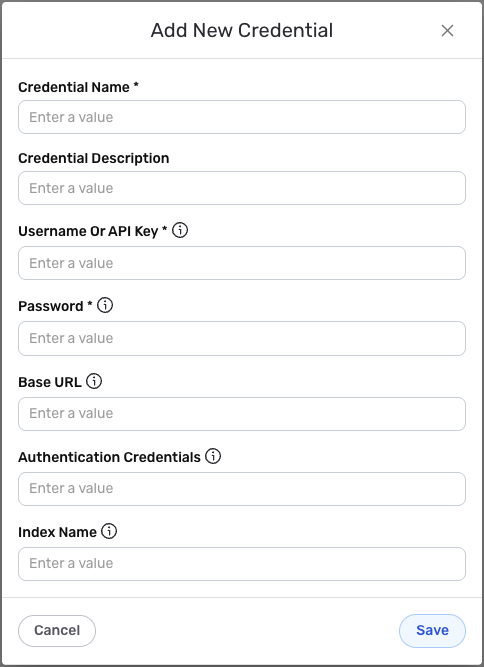
- To create a new Elasticsearch credential, after selecting the data source/destination type, click the Add Credential tile to open the Add New Credential overlay.
New Credential Overlay – Elasticsearch
Credential Name & Description
-
Enter a name for the credential in the Credential Name field and a short, meaningful description in the Credential Description field.
Resource descriptions are recommended but are not required. They should be used to provide information about the resource purpose, data freshness, etc. that can help the owner and other users efficiently understand and utilize the resource.
Basic Authentication Configuration
-
Username or API Key: Enter your Elasticsearch username or API key in the Username Or API Key field. This is used for basic authentication with your Elasticsearch cluster. If you're using API key authentication, enter the API key here.
-
Password: Enter your Elasticsearch password in the Password field. This is required for basic authentication. If you're using API key authentication, you may leave this empty or enter a placeholder value.
-
Base URL: Enter the base URL for your Elasticsearch cluster in the Base URL field. This should be the complete URL including the protocol (https://) and domain (e.g.,
https://your-cluster.es.amazonaws.comorhttps://your-deployment.es.cloud.io). -
Index Name: Enter the name of the Elasticsearch index you'll be working with in the Index Name field (e.g.,
my-index). This index will be used for data operations.
The authentication credentials are sensitive information that should be kept secure. Nexla will store this credential securely and use it only for API authentication purposes. For Elasticsearch Cloud deployments, you can find your base URL and credentials in your deployment settings. For self-managed clusters, use the cluster URL and credentials configured during setup.
Save the Credential
-
Once all of the relevant steps in the above sections have been completed, click the Save button at the bottom of the overlay to save the configured credential.
-
The newly added credential will now appear in a tile on the Authenticate screen during data source/destination creation and can be selected for use with a new data source or destination.