Customerly Data Source

Customerly
Create a New Data Flow
-
To create a new data flow, navigate to the Integrate section, and click the New Data Flow button. Then, select the desired flow type from the list, and click the Create button.
-
Select the Customerly connector tile from the list of available connectors. Then, select the credential that will be used to connect to the Customerly instance, and click Next; or, create a new Customerly credential for use in this flow.
-
In Nexla, Customerly data sources can be created using pre-built endpoint templates, which expedite source setup for common Customerly endpoints. Each template is designed specifically for the corresponding Customerly endpoint, making source configuration easy and efficient.
• To configure this source using a template, follow the instructions in Configure Using a Template.Customerly sources can also be configured manually, allowing you to ingest data from Customerly endpoints not included in the pre-built templates or apply further customizations to exactly suit your needs.
• To configure this source manually, follow the instructions in Configure Manually.
Configure Using a Template
Nexla provides pre-built templates that can be used to rapidly configure data sources to ingest data from common Customerly endpoints. Each template is designed specifically for the corresponding Customerly endpoint, making data source setup easy and efficient.
Endpoint Settings
- Select the endpoint from which this source will fetch data from the Endpoint pulldown menu. Available endpoint templates are listed in the expandable boxes below. Click on an endpoint to see more information about it and how to configure your data source for this endpoint.
Endpoint Testing
Once the selected endpoint template has been configured, Nexla can retrieve a sample of the data that will be fetched according to the current settings. This allows users to verify that the source is configured correctly before saving.
-
To test the current endpoint configuration, click the Test button to the right of the endpoint selection menu. Sample data will be fetched & displayed in the Endpoint Test Result panel on the right.
-
If the sample data is not as expected, review the selected endpoint and associated settings, and make any necessary adjustments. Then, click the Test button again, and check the sample data to ensure that the correct information is displayed.
Configure Manually
Customerly data sources can be manually configured to ingest data from any valid Customerly API endpoint. Manual configuration provides maximum flexibility for accessing endpoints not covered by pre-built templates or when you need custom API configurations.
With manual configuration, you can also create more complex Customerly sources, such as sources that use chained API calls to fetch data from multiple endpoints or sources that require custom request parameters.
API Method
-
To manually configure this source, select the Advanced tab at the top of the configuration screen.
-
Select the API method that will be used for calls to the Customerly API from the Method pulldown menu. The most common methods are:
- GET: For retrieving data from the API
- POST: For sending data to the API or triggering actions
- PUT: For updating existing data
- PATCH: For partial updates to existing data
- DELETE: For removing data
API Endpoint URL
- Enter the URL of the Customerly API endpoint from which this source will fetch data in the Set API URL field. The Customerly REST API base URL is
https://api.customerly.io/v1/, followed by the resource path (for example,https://api.customerly.io/v1/users/list).
Ensure the API endpoint URL is correct and accessible with your current credentials. You can test the endpoint using the Test button after configuring the URL. Full API endpoint documentation is available via the Customerly REST API reference.
Date/Time Macros (API URL)
Optionally, the API URL can be customized using macros—all macros added to the API URL will be converted into values when Nexla executes the API call. Macros are dynamic placeholders that allow you to create flexible API endpoints that can adapt to different time periods or data requirements.
Macros are particularly useful for Customerly endpoints that accept date range parameters, allowing you to incrementally fetch only new or updated records between runs.
-
To add a macro, type
{at the appropriate position in the API URL (within the Set API URL field), and select the desired macro from the dropdown list.{now}– The current datetime{now-1}– The datetime one time unit before the current datetime{now+1}– The datetime one time unit after the current datetimecustom– Datetime macros can reference any number of time units before or after the current datetime—for example, enter(now-4)to indicate the datetime four time units before the current datetime
-
Select the format that will be applied to datetime macros from the Date Format for Date/Time Macro pulldown menu. This format will be applied to the base datetime value of the macro—i.e., the value of
{now}in{now-1}. -
Select the datetime unit that will be used to perform mathematical operations in the included macro(s) from the Time Unit for Operations pulldown menu—for example, for the macro
{now-1}, whenDayis selected,{now-1}will be converted to the datetime one day before the current datetime.
Lookup-Based Macros (API URL)
Column values from existing lookups can also be included as macros in the API URL. Lookup-based macros allow you to reference data from previously configured data sources or lookups, enabling dynamic API endpoints that can adapt based on existing data.
Lookup-based macros are useful when you need to create Customerly API endpoints that reference specific IDs or values from other data sources in your Nexla environment — for example, using a list of user IDs retrieved from one source to fetch detailed records from another.
-
To include a lookup column value macro, select the relevant lookup from the Add Lookups to Supported Macros pulldown menu.
-
Type
{at the appropriate position in the API URL, and select the lookup column-based macro from the dropdown list. Lookup-based macros are automatically populated into the macro list when a lookup is selected in the Add Lookups to Supported Macros pulldown menu.
Path to Data
If only a subset of the data returned by the Customerly API endpoint is needed, you can designate the part of the response that should be included in the Nexsets produced from this source by specifying the path to the relevant data within the response.
For example, the Customerly API typically returns paginated lists nested under a data key (e.g., $.data.users[*] for the List Users endpoint or $.data[*] for tag and account endpoints). By entering the path to the relevant data, you can configure Nexla to treat each element of the returned array as a record.
Path to Data is essential when Customerly API responses have nested structures. Without specifying the correct path, Nexla might not be able to properly parse and organize your data into usable records.
-
To specify which data should be treated as relevant in responses from this source, enter the path to the relevant data in the Set Path to Data in Response field.
- For responses in JSON format, enter the JSON path that points to the object or array that should be treated as relevant data. JSON paths use dot notation (e.g.,
$.data.users[*]to access the users array within a data object).
Path to Data Example:The Customerly List Users endpoint returns JSON where users are nested as
$.data.users[*], while endpoints such as List Tags and List Accounts return arrays directly at$.data[*]. Single-record endpoints (such as Get User by Email) return the object at$.data. - For responses in JSON format, enter the JSON path that points to the object or array that should be treated as relevant data. JSON paths use dot notation (e.g.,
Autogenerate Path Suggestions
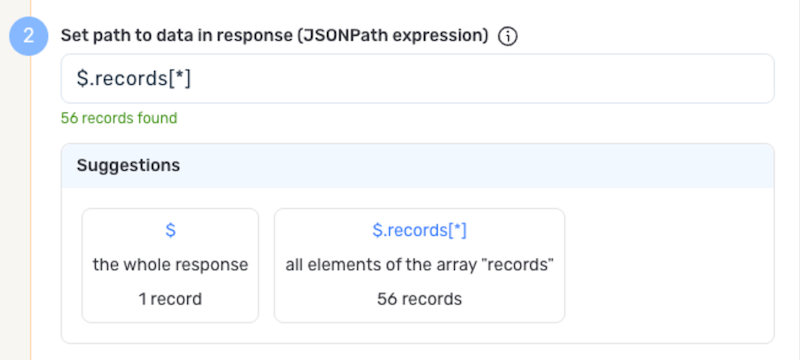
Nexla can also autogenerate data path suggestions based on the response from the API endpoint. These suggested paths can be used as-is or modified to exactly suit your needs.
-
To use this feature, click the Test button next to the Set API URL field to fetch a sample response from the API endpoint. Suggested data paths generated based on the content & format of the response will be displayed in the Suggestions box below the Set Path to Data in Response field.
-
Click on a suggestion to automatically populate the Set Path to Data in Response field with the corresponding path. The populated path can be modified directly within the field if further customization is needed.
Metadata
If metadata is included in the Customerly API response but is located outside of the defined path to relevant data, you can configure Nexla to include this data as common metadata in each record.
For example, the Customerly API often includes pagination context (such as total record counts) at the top level of a response. If you have specified the path to the user array but also want to capture the total user count, you can specify a path to the metadata to include it with each record.
Metadata paths are particularly useful for preserving API response context like total counts, page numbers, or request timestamps that apply to all records in the response.
-
To specify the location of metadata that should be included with each record, enter the path to the relevant metadata in the Path to Metadata in Response field.
- For responses in JSON format, enter the JSON path to the object or array that contains the metadata.
Request Headers
-
If Nexla should include any additional request headers in API calls to this source, enter the headers & corresponding values as comma-separated pairs in the Request Headers field (e.g.,
header1:value1,header2:value2).You do not need to include the
Authenticationheader — Nexla automatically includes your Customerly Bearer token from the configured credential in all API requests.
Endpoint Testing
After configuring all settings for the selected endpoint, Nexla can retrieve a sample of the data that will be fetched according to the current configuration. This allows users to verify that the source is configured correctly before saving.
-
To test the current endpoint configuration, click the Test button to the right of the endpoint selection menu. Sample data will be fetched & displayed in the Endpoint Test Result panel on the right.
-
If the sample data is not as expected, review the selected endpoint and associated settings, and make any necessary adjustments. Then, click the Test button again, and check the sample data to ensure that the correct information is displayed.
Save & Activate the Source
- Once all of the relevant steps in the above sections have been completed, click the Create button in the upper right corner of the screen to save and create the new Customerly data source. Nexla will now begin ingesting data from the configured endpoint and will organize any data that it finds into one or more Nexsets.