Authorization

Amazon Ads
Prerequisites
Before creating an Amazon Ads credential in Nexla, you need to set up an OAuth 2.0 integration in the Amazon Advertising API and obtain the required credentials. Amazon Ads API access is available through different URL endpoints depending on your region.
OAuth 2.0 Setup
-
Access Amazon Advertising API: Sign in to your Amazon Advertising account and navigate to the Amazon Advertising API documentation.
-
Register Your Application: Register your application with Amazon to obtain OAuth 2.0 credentials. This process generates a Client ID and Client Secret that you'll use for authentication.
-
Configure OAuth Settings: Configure your OAuth application settings, including redirect URIs and scopes. The redirect URI should match the callback URL provided by Nexla during the OAuth flow.
-
Select API Endpoint: Determine which Amazon Ads API endpoint you need based on your region:
- North America (NA):
https://advertising-api.amazon.com - Europe (EU):
https://advertising-api-eu.amazon.com - Far East (FE):
https://advertising-api-fe.amazon.com
- North America (NA):
-
Select Authorization URL: Choose the appropriate authorization URL for your region:
- North America:
https://www.amazon.com/ap/oa - Europe:
https://eu.account.amazon.com/ap/oa - Far East:
https://apac.account.amazon.com/ap/oa
- North America:
-
Select Token URL: Choose the appropriate token URL for your region:
- North America:
https://api.amazon.com/auth/o2/token - Europe:
https://api.amazon.co.uk/auth/o2/token - Far East:
https://api.amazon.co.jp/auth/o2/token
- North America:
-
Obtain Client Credentials: Copy your Client ID and Client Secret from your OAuth application settings. These credentials are used to authenticate with the Amazon Advertising API.
-
Select OAuth Scope: Choose the appropriate OAuth scope based on the APIs you want to access:
- advertising::campaign_management: For DSP, Sponsored Brands, Sponsored Display, Sponsored Products, and Amazon Attribution APIs
- advertising::audiences: For Data Provider API
- advertising::test:create_account: Only for Test APIs
- advertising::test:create_account advertising::campaign_management advertising::audiences: For complete API access, including creation of test accounts
The OAuth scope determines which APIs your application can access. Choose the scope that matches your use case. For detailed information about Amazon Ads API authentication and OAuth setup, see the Amazon Advertising API documentation.
Create an Amazon Ads Credential
- To create a new Amazon Ads credential, after selecting the data source/destination type, click the Add Credential tile to open the Add New Credential overlay.
New Credential Overlay – Amazon Ads
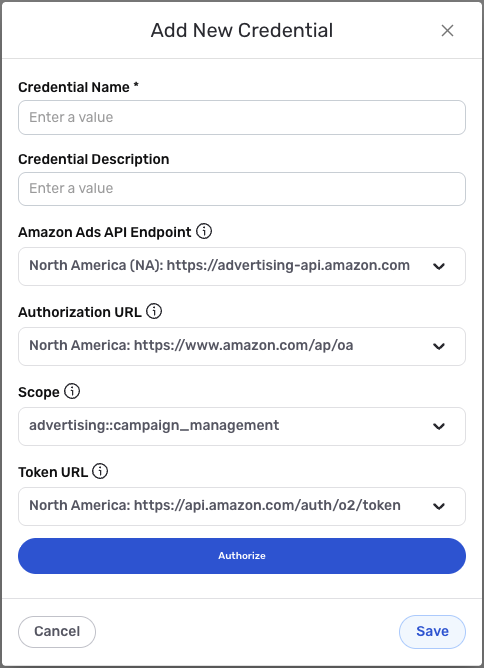
Credential Name & Description
-
Enter a name for the credential in the Credential Name field and a short, meaningful description in the Credential Description field.
Resource descriptions are recommended but are not required. They should be used provide information about the resource purpose, data freshness, etc. that can help the owner and other users efficiently understand and utilize the resource.
OAuth2 Configuration
-
Select the Amazon Ads API endpoint that matches your region from the Amazon Ads API Endpoint dropdown menu. Available options include:
- North America (NA):
https://advertising-api.amazon.com - Europe (EU):
https://advertising-api-eu.amazon.com - Far East (FE):
https://advertising-api-fe.amazon.com
- North America (NA):
-
Select the authorization URL that matches your region from the Authorization URL dropdown menu. Available options include:
- North America:
https://www.amazon.com/ap/oa - Europe:
https://eu.account.amazon.com/ap/oa - Far East:
https://apac.account.amazon.com/ap/oa
- North America:
-
Enter your OAuth Client ID in the Client ID field. This should be the Client ID obtained from your OAuth application registration with Amazon Advertising.
-
Select the OAuth scope from the Scope dropdown menu based on the APIs you want to access. Available options include:
- advertising::campaign_management: For DSP, Sponsored Brands, Sponsored Display, Sponsored Products, and Amazon Attribution APIs
- advertising::audiences: For Data Provider API
- advertising::test:create_account: Only for Test APIs
- advertising::test:create_account advertising::campaign_management advertising::audiences: For complete API access
-
Select the token URL that matches your region from the Token URL dropdown menu. Available options include:
- North America:
https://api.amazon.com/auth/o2/token - Europe:
https://api.amazon.co.uk/auth/o2/token - Far East:
https://api.amazon.co.jp/auth/o2/token
- North America:
-
Complete the OAuth authorization flow by following the prompts to authorize Nexla to access your Amazon Ads account. The OAuth flow will automatically handle token exchange and refresh.
The OAuth 2.0 flow provides secure, token-based access to the Amazon Advertising API with automatic token refresh. Ensure that you select the correct region-specific endpoints and URLs to match your Amazon Advertising account location. For detailed information about Amazon Ads API authentication, see the Amazon Advertising API documentation.
Save the Credential
-
Once all of the relevant steps in the above sections have been completed, click the Save button at the bottom of the overlay to save the configured credential.
-
The newly added credential will now appear in a tile on the Authenticate screen during data source/destination creation and can be selected for use with a new data source or destination.