Authorization

Xero
Prerequisites
Before creating a Xero credential in Nexla, you need to set up an OAuth 1.0a integration in the Xero Developer Portal and obtain the required credentials. This integration enables programmatic access to the Xero API without requiring user interaction for each request.
OAuth 1.0a Setup
OAuth 1.0a authentication provides secure, token-based access to the Xero API. The OAuth flow allows Nexla to access your Xero account on your behalf. For detailed information about setting up OAuth 1.0a authentication, see the Xero API documentation.
-
Access Xero Developer Portal: Sign in to your Xero account and navigate to the Xero Developer Portal.
-
Create an OAuth App: Create a new OAuth app in the developer console. This will generate a Consumer Key and Consumer Secret that you'll use for authentication.
-
Configure OAuth Settings: Configure your OAuth app settings, including redirect URIs and scopes. The redirect URI should match the callback URL provided by Nexla during the OAuth flow.
-
Obtain Consumer Credentials: Copy your Consumer Key and Consumer Secret from the OAuth app settings. These credentials are used to authenticate with the Xero OAuth 1.0a service.
Create a Xero Credential
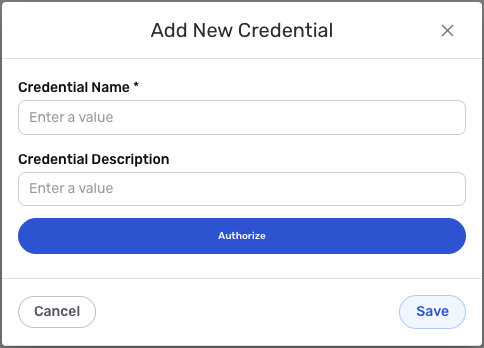
- To create a new Xero credential, after selecting the data source/destination type, click the Add Credential tile to open the Add New Credential overlay.
New Credential Overlay – Xero
Credential Name & Description
-
Enter a name for the credential in the Credential Name field and a short, meaningful description in the Credential Description field.
Resource descriptions are recommended but are not required. They should be used provide information about the resource purpose, data freshness, etc. that can help the owner and other users efficiently understand and utilize the resource.
OAuth 1.0a Configuration
-
Complete the OAuth authorization flow by following the prompts to authorize Nexla to access your Xero account. The OAuth flow will automatically handle token exchange and refresh. During the authorization process, you will be redirected to Xero to grant permissions to Nexla.
The OAuth 1.0a flow provides secure, token-based access to the Xero API. The authorization process requires you to sign in to your Xero account and grant permissions to Nexla. For detailed information about Xero API authentication, see the Xero API documentation.
All OAuth configuration settings are automatically handled by Nexla. You only need to complete the authorization flow by clicking the Authorize button and granting permissions to Nexla in the Xero authorization page.
Save the Credential
-
Once all of the relevant steps in the above sections have been completed, click the Save button at the bottom of the overlay to save the configured credential.
-
The newly added credential will now appear in a tile on the Authenticate screen during data source/destination creation and can be selected for use with a new data source or destination.