Authorization

OpenRouter
Prerequisites
Before creating an OpenRouter credential, you'll need to obtain an API key from your OpenRouter account. OpenRouter uses API key-based authentication for API access.
OpenRouter API Key Setup
To obtain the required API key for OpenRouter API access:
-
Sign up for OpenRouter: Create an account at https://openrouter.ai if you don't already have one.
-
Navigate to API Keys:
- Log in to your OpenRouter account
- Go to Settings > API Keys or Account > API Keys
- Locate the API keys section
-
Generate API Key:
- Click Create API Key or Generate New Key to create a new API key
- You'll receive an encoded string value that serves as your secret token
- Copy the API key value immediately, as it may only be displayed once
OpenRouter API keys are specific to your account and should be kept secure. The API key is used to authenticate all API requests to OpenRouter. For detailed information about OpenRouter API authentication and API keys, refer to the OpenRouter API Documentation.
API Access Requirements
OpenRouter API access requires:
- OpenRouter Account: You must have an active OpenRouter account
- API Key: An API key generated from your OpenRouter account
- Network Access: Ensure your network allows connections to
https://openrouter.ai
For complete information about OpenRouter API setup and authentication, see the OpenRouter API Documentation.
Create an OpenRouter Credential
- To create a new OpenRouter credential, after selecting the data source/destination type, click the Add Credential tile to open the Add New Credential overlay.
New Credential Overlay – OpenRouter
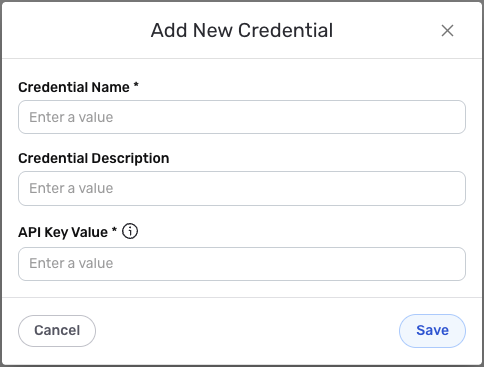
Credential Name & Description
-
Enter a name for the credential in the Credential Name field and a short, meaningful description in the Credential Description field.
Resource descriptions are recommended but are not required. They should be used to provide information about the resource purpose, data freshness, etc. that can help the owner and other users efficiently understand and utilize the resource.
API Key Configuration
- API Key Value: Enter your OpenRouter API key in the API Key Value field. This is the encoded string value that serves as a secret token to authenticate API requests on OpenRouter.
The API key is sensitive information that should be kept secure. Nexla will store this credential securely and use it only for API authentication purposes. The API key is sent in the request headers with each API request to OpenRouter.
Authentication Configuration Details
OpenRouter API uses API key authentication. This configuration is automatically handled by Nexla:
- Authentication Type: API key authentication
- Header Format: The API key is included in request headers
- Request Format: All API requests use JSON content type
- Base URL:
https://openrouter.ai/api/v1
The authentication configuration is automatically managed by Nexla. You only need to provide your API key value.
Save the Credential
-
Once all of the relevant steps in the above sections have been completed, click the Save button at the bottom of the overlay to save the configured credential.
-
The newly added credential will now appear in a tile on the Authenticate screen during data source/destination creation and can be selected for use with a new data source or destination.