
Leapsome Data Source

The Leapsome connector enables you to ingest people data — including employees, teams, goals, OKRs, review cycles, engagement surveys, competencies, instant feedback, and 1-on-1 meetings — from Leapsome into any destination in Nexla. Follow the instructions below to create a new data flow that ingests data from a Leapsome source in Nexla.
leapsome_api.png

Leapsome

Create a New Data Flow

  1. To create a new data flow, navigate to the Integrate section, and click the New Data Flow button. Then, select the desired flow type from the list, and click the Create button.

  2. Select the Leapsome connector tile from the list of available connectors. Then, select the credential that will be used to connect to the Leapsome instance, and click Next; or, create a new Leapsome credential for use in this flow.

  3. In Nexla, Leapsome data sources can be created using pre-built endpoint templates, which expedite source setup for common Leapsome endpoints. Each template is designed specifically for the corresponding Leapsome API endpoint, making source configuration easy and efficient.
    • To configure this source using a template, follow the instructions in Configure Using a Template.

    Leapsome sources can also be configured manually, allowing you to ingest data from Leapsome endpoints not included in the pre-built templates or apply further customizations to exactly suit your needs.
    • To configure this source manually, follow the instructions in Configure Manually.

Configure Using a Template

Nexla provides pre-built templates that can be used to rapidly configure data sources to ingest data from common Leapsome endpoints. Each template is designed specifically for the corresponding Leapsome API endpoint, making data source setup easy and efficient.

Endpoint Settings

  • Select the endpoint from which this source will fetch data from the Endpoint pulldown menu. Available endpoint templates are listed in the expandable boxes below. Click on an endpoint to see more information about it and how to configure your data source for this endpoint.

List Users

Retrieves all employees in your Leapsome organization, including profile details, employment status, manager relationships, team membership, and department. This endpoint is the foundation for all downstream joins across reviews, goals, and surveys, and is typically the starting point for any people analytics pipeline.

  • This endpoint uses automatic cursor-based pagination. Nexla manages page navigation automatically, so no manual pagination configuration is required.
  • Optionally, configure the following parameter to control the volume of records returned per API call:

    • Page Size: The number of user records to return per page. Accepts an integer up to a maximum of 100. Defaults to 100 if left blank.

The List Users endpoint returns all active and inactive employees accessible to the authenticated API token. Use this data to build org charts, join with review or goal data by user ID, or sync your Leapsome roster to external HR systems.

Get User

Retrieves full profile details for a single employee by their Leapsome user ID. Use this endpoint for targeted record refreshes, ID resolution workflows, or when you need the complete profile for a specific individual without fetching the entire roster.

  • Enter the Leapsome internal user ID in the User ID field. This field is required.

    • User IDs can be obtained by first running the List Users endpoint and extracting the id field from the response records.

This endpoint retrieves data for a single user in one API call. For bulk user data ingestion, use the List Users endpoint instead.

List Teams

Retrieves all teams and the department hierarchy defined in your Leapsome organization. Use this endpoint to build org chart analytics, segment review cycle data by team, or sync team structure to external BI tools.

  • This endpoint uses automatic cursor-based pagination managed by Nexla. No manual pagination configuration is required.
  • Optionally, configure the following parameter:

    • Page Size: The number of team records to return per page. Accepts an integer up to a maximum of 100. Defaults to 100 if left blank.

List Employee Attributes

Retrieves custom HR attribute definitions configured in Leapsome, such as salary band, tenure, location, or any other custom fields your organization has created. Use this endpoint to sync HR attribute metadata from Leapsome to external systems or to understand the schema of custom profile data before joining it with other employee records.

  • This endpoint uses automatic cursor-based pagination. Nexla manages page navigation automatically.
  • Optionally, configure the following parameter:

    • Page Size: The number of attribute records to return per page. Accepts an integer up to a maximum of 100. Defaults to 100 if left blank.

List Goals

Retrieves all goals in your Leapsome organization, including goal owner, associated team, current progress, status, linked competency, and due date. This is the primary OKR table and a key input for AI-powered goal generation and progress analytics.

  • This endpoint uses offset-based pagination. Nexla manages page advancement automatically.
  • Optionally, configure the following parameters:

    • Page Size: The number of goals to return per page. Accepts an integer up to a maximum of 100. Defaults to 100 if left blank.
    • Status Filter: Filters the returned goals by their current status. Leave blank to return goals at all statuses. Available status values are:

      • On Track — Goals currently progressing as planned.
      • At Risk — Goals that may not be completed on time without intervention.
      • Off Track — Goals that are behind schedule.
      • Completed — Goals that have been marked as complete.
      • Archived — Goals that have been archived.

To retrieve the full detail of a specific goal including its key results, sub-goals, and progress history, use the Get Goal endpoint with the goal ID obtained from this list.

Get Goal

Retrieves full detail for a single goal by its Leapsome goal ID, including key results, sub-goals, linked initiatives, progress history, and audit trail. Use this endpoint when you need the complete goal record for a specific objective.

  • Enter the Leapsome goal ID in the Goal ID field. This field is required.

    • Goal IDs can be obtained by first running the List Goals endpoint and extracting the id field from the returned records.

List Key Results

Retrieves all key results for a specific goal, including current and target values. Use this endpoint to enable automated OKR progress synchronization from CRM systems, Jira, or other external tools that track the underlying metrics.

  • Enter the parent goal's Leapsome ID in the Goal ID field. This field is required. Use the List Goals endpoint to obtain goal IDs.

  • This endpoint uses automatic cursor-based pagination. Nexla manages page navigation automatically. No additional pagination configuration is required.

Key result current and target values are returned as numeric fields. These values can be used as the input to the Update Key Result Progress destination endpoint to write progress back to Leapsome from an external system.

List Review Cycles

Retrieves all configured review cycles in Leapsome, including cycle type (such as 360-degree, annual, or project-based), current status, date range, and participant count. This endpoint is the entry point for any review data pipeline and is typically used to identify the cycle IDs needed for downstream review answer and assessment queries.

  • This endpoint uses automatic cursor-based pagination managed by Nexla.
  • Optionally, configure the following parameters:

    • Page Size: The number of review cycle records to return per page. Accepts an integer up to a maximum of 100. Defaults to 100 if left blank.
    • Status Filter: Filters the returned review cycles by status. Leave blank to return all cycles. Available status values are:

      • Active — Review cycles currently in progress.
      • Completed — Review cycles that have finished.
      • Draft — Review cycles that have been created but not yet launched.

Review cycle IDs returned by this endpoint are required parameters for the List Review Answers, List Review Assessments, and List Review Participants endpoints.

List Review Answers

Retrieves question scores and open-text responses for each reviewee/reviewer pair within a specific review cycle. This endpoint provides the raw answer corpus used for AI-powered review summaries, sentiment analysis, and people analytics dashboards.

  • Enter the Leapsome review cycle ID in the Review Cycle ID field. This field is required. Use the List Review Cycles endpoint to obtain cycle IDs.

  • This endpoint uses offset-based pagination. Nexla manages page advancement automatically.
  • Optionally, configure the following parameter:

    • Page Size: The number of answer records to return per page. Accepts an integer up to a maximum of 100. Defaults to 100 if left blank.

To interpret the meaning of individual questions and rating scales in the returned answers, pair this data with records from the List Review Templates endpoint.

List Review Assessments

Retrieves aggregated competency scores per employee for a specific review cycle. These assessment records are the primary input for AI-powered calibration tools, talent analytics, compensation decision support, and skill gap analysis.

  • Enter the Leapsome review cycle ID in the Review Cycle ID field. This field is required. Use the List Review Cycles endpoint to obtain cycle IDs.

  • This endpoint uses offset-based pagination. Nexla manages page advancement automatically.
  • Optionally, configure the following parameter:

    • Page Size: The number of assessment records to return per page. Accepts an integer up to a maximum of 100. Defaults to 100 if left blank.

List Review Templates

Retrieves review template structure, question bank, and rating scale definitions. This metadata is required for correctly interpreting raw review answer records — without knowing the question text and scale, numeric scores from List Review Answers cannot be properly analyzed.

  • This endpoint uses automatic cursor-based pagination. Nexla manages page navigation automatically.
  • Optionally, configure the following parameter:

    • Page Size: The number of review template records to return per page. Accepts an integer up to a maximum of 100. Defaults to 100 if left blank.

List Review Participants

Retrieves participant completion status for a specific review cycle. Use this endpoint to track review submission rates, monitor review cycle health metrics, and identify which reviewers have not yet completed their assigned reviews.

  • Enter the Leapsome review cycle ID in the Review Cycle ID field. This field is required. Use the List Review Cycles endpoint to obtain cycle IDs.

  • This endpoint uses automatic cursor-based pagination. Nexla manages page navigation automatically.
  • Optionally, configure the following parameter:

    • Page Size: The number of participant records to return per page. Accepts an integer up to a maximum of 100. Defaults to 100 if left blank.

List Surveys

Retrieves all survey instances in Leapsome, including survey type (engagement, pulse, onboarding, or exit), date range, and overall participation rate. This endpoint is the entry point for any survey data pipeline and provides the survey IDs needed for downstream result and comment queries.

  • This endpoint uses automatic cursor-based pagination. Nexla manages page navigation automatically.
  • Optionally, configure the following parameters:

    • Page Size: The number of survey records to return per page. Accepts an integer up to a maximum of 100. Defaults to 100 if left blank.
    • Survey Type Filter: Filters the returned surveys by type. Leave blank to return all surveys. Available type values are:

      • Engagement — Comprehensive engagement surveys.
      • Pulse — Short, frequent pulse check-ins.
      • Onboarding — Surveys sent to new hires during their onboarding period.
      • Exit — Surveys sent to departing employees.

Survey IDs returned by this endpoint are required parameters for the List Survey Results, List Survey Comments, and List Survey Questions endpoints.

List Survey Results

Retrieves aggregated score data broken down by question category and team segment for a specific survey. These results are the primary input for AI-powered sentiment analysis, engagement insight reports, and management dashboard metrics.

  • Enter the Leapsome survey ID in the Survey ID field. This field is required. Use the List Surveys endpoint to obtain survey IDs.

  • This endpoint uses offset-based pagination. Nexla manages page advancement automatically.
  • Optionally, configure the following parameter:

    • Page Size: The number of result records to return per page. Accepts an integer up to a maximum of 100. Defaults to 100 if left blank.

List Survey Comments

Retrieves anonymized open-text responses submitted in a specific survey. These comments are the primary corpus for AI-powered theme extraction, natural language processing (NLP) analysis, and sentiment pipelines. Leapsome returns these responses anonymized to protect respondent identity.

  • Enter the Leapsome survey ID in the Survey ID field. This field is required. Use the List Surveys endpoint to obtain survey IDs.

  • This endpoint uses offset-based pagination. Nexla manages page advancement automatically.
  • Optionally, configure the following parameter:

    • Page Size: The number of comment records to return per page. Accepts an integer up to a maximum of 100. Defaults to 100 if left blank.

Survey comments are anonymized by Leapsome and do not contain individual respondent identifiers. Use this data for aggregate text analysis rather than per-respondent tracking.

List Survey Questions

Retrieves the question text, question type, and category for all questions in a specific survey. This metadata is required to decode survey score and comment records returned by List Survey Results and List Survey Comments for downstream analytics.

  • Enter the Leapsome survey ID in the Survey ID field. This field is required. Use the List Surveys endpoint to obtain survey IDs.

  • This endpoint returns all questions in a single call without pagination.

List Competencies

Retrieves all competencies defined in Leapsome, along with their seniority levels, behavioral descriptions, and linked roles. This data is the source for AI-powered competency framework generation, skill recommenders, and career path analysis tools.

  • This endpoint uses automatic cursor-based pagination. Nexla manages page navigation automatically.
  • Optionally, configure the following parameter:

    • Page Size: The number of competency records to return per page. Accepts an integer up to a maximum of 100. Defaults to 100 if left blank.

Competency IDs returned by this endpoint are required parameters for the List Competency Scores and List Competency Levels endpoints.

List Competency Scores

Retrieves per-user scores for a specific competency over time. Use this data to power skill gap analysis, learning and development (L&D) recommendations, and compensation calibration workflows.

  • Enter the Leapsome competency ID in the Competency ID field. This field is required. Use the List Competencies endpoint to obtain competency IDs.

  • This endpoint uses offset-based pagination. Nexla manages page advancement automatically.
  • Optionally, configure the following parameter:

    • Page Size: The number of score records to return per page. Accepts an integer up to a maximum of 100. Defaults to 100 if left blank.

List Competency Levels

Retrieves the level definitions for each seniority band associated with a specific competency. This metadata provides the context needed for calibration discussions, career framework design, and compensation decisions.

  • Enter the Leapsome competency ID in the Competency ID field. This field is required. Use the List Competencies endpoint to obtain competency IDs.

  • This endpoint returns all level definitions for the specified competency in a single call without pagination.

List Instant Feedback

Retrieves real-time feedback events from the Leapsome continuous feedback stream, including the giver, receiver, associated competency tag, and feedback text. This endpoint is the primary data source for people analytics involving continuous feedback, coaching pattern analysis, and culture metrics.

  • This endpoint uses offset-based pagination. Nexla manages page advancement automatically.
  • Optionally, configure the following parameters to filter feedback by date range:

    • From Date: The start of the date range for feedback events to include. Accepts ISO 8601 format (for example, 2024-01-01T00:00:00Z). Defaults to 90 days before the current date ({now-90}) if left blank.
    • To Date: The end of the date range for feedback events to include. Accepts ISO 8601 format (for example, 2024-12-31T23:59:59Z). Defaults to the current datetime ({now}) if left blank.
    • Page Size: The number of feedback records to return per page. Accepts an integer up to a maximum of 100. Defaults to 100 if left blank.

The default date range of 90 days is suitable for incremental loads. For an initial historical backfill, set the From Date to the earliest date for which your organization has feedback data in Leapsome.

List Meetings

Retrieves 1-on-1 meeting records from Leapsome, including agenda completion status, outstanding action items, attendees, and meeting date. Use this endpoint to analyze manager-employee meeting cadence, track action item follow-through, and integrate meeting outcomes with project management tools.

  • This endpoint uses offset-based pagination. Nexla manages page advancement automatically.
  • Optionally, configure the following parameters to filter meetings by date range:

    • From Date: The start of the date range for meeting records to include. Accepts ISO 8601 format (for example, 2024-01-01T00:00:00Z). Defaults to 90 days before the current date ({now-90}) if left blank.
    • To Date: The end of the date range for meeting records to include. Accepts ISO 8601 format (for example, 2024-12-31T23:59:59Z). Defaults to the current datetime ({now}) if left blank.
    • Page Size: The number of meeting records to return per page. Accepts an integer up to a maximum of 100. Defaults to 100 if left blank.

Meeting IDs returned by this endpoint are required when using the Create Meeting Action Item destination endpoint to write action items back to Leapsome from external meeting tools.

Endpoint Testing

Once the selected endpoint template has been configured, Nexla can retrieve a sample of the data that will be fetched according to the current settings. This allows users to verify that the source is configured correctly before saving.

  • To test the current endpoint configuration, click the Test button to the right of the endpoint selection menu. Sample data will be fetched & displayed in the Endpoint Test Result panel on the right.

  • If the sample data is not as expected, review the selected endpoint and associated settings, and make any necessary adjustments. Then, click the Test button again, and check the sample data to ensure that the correct information is displayed.

Configure Manually

Leapsome data sources can be manually configured to ingest data from any valid Leapsome API endpoint. Manual configuration provides maximum flexibility for accessing endpoints not covered by pre-built templates or when you need custom API configurations.

With manual configuration, you can also create more complex Leapsome sources, such as sources that use chained API calls to fetch data from multiple endpoints or sources that require custom request parameters.

API Method

  1. To manually configure this source, select the Advanced tab at the top of the configuration screen.

  2. Select the API method that will be used for calls to the Leapsome API from the Method pulldown menu. The most common method for Leapsome read operations is:

    • GET: For retrieving data from any Leapsome API endpoint.

API Endpoint URL

  1. Enter the URL of the Leapsome API endpoint from which this source will fetch data in the Set API URL field. All Leapsome Content API endpoints begin with https://api.leapsome.com/v1/. For example, to fetch users you would enter https://api.leapsome.com/v1/users.

The complete list of available Leapsome API endpoints and their parameters is documented in the Leapsome API reference.

Date/Time Macros (API URL)

Optional

Optionally, the API URL can be customized using macros—all macros added to the API URL will be converted into values when Nexla executes the API call. Macros are dynamic placeholders that allow you to create flexible API endpoints that can adapt to different time periods or data requirements. This is particularly useful for Leapsome endpoints like List Instant Feedback and List Meetings, which support from and to date parameters.

Macros are particularly useful for Leapsome date-filtered endpoints, allowing you to create incremental data flows that automatically retrieve only new records since the last run.

  1. To add a macro, type { at the appropriate position in the API URL (within the Set API URL field), and select the desired macro from the dropdown list.

    • {now} – The current datetime
    • {now-1} – The datetime one time unit before the current datetime
    • {now+1} – The datetime one time unit after the current datetime
    • custom – Datetime macros can reference any number of time units before or after the current datetime—for example, enter (now-4) to indicate the datetime four time units before the current datetime
  2. Select the format that will be applied to datetime macros from the Date Format for Date/Time Macro pulldown menu. Leapsome date parameters accept ISO 8601 format (e.g., yyyy-MM-dd'T'HH:mm:ss'Z').

  3. Select the datetime unit that will be used to perform mathematical operations in the included macro(s) from the Time Unit for Operations pulldown menu—for example, for the macro {now-1}, when Day is selected, {now-1} will be converted to the datetime one day before the current datetime.

Lookup-Based Macros (API URL)

Optional

Column values from existing lookups can also be included as macros in the API URL. Lookup-based macros allow you to reference data from previously configured data sources or lookups, enabling dynamic API endpoints that adapt based on existing data. For example, you could reference a list of Leapsome cycle IDs from an upstream source to automatically iterate over multiple review cycles.

  1. To include a lookup column value macro, select the relevant lookup from the Add Lookups to Supported Macros pulldown menu.

  2. Type { at the appropriate position in the API URL, and select the lookup column-based macro from the dropdown list.

Path to Data

Optional

If only a subset of the data returned by the Leapsome API endpoint is needed, you can designate the part of the response that should be included in the Nexset by specifying the path to the relevant data. Leapsome API responses typically wrap records in a top-level data array alongside pagination metadata.

For example, a GET /users response returns a structure like {"data": [...], "nextPageToken": "..."}. By specifying the path $.data[*], you instruct Nexla to treat each element of the data array as a record.

Path to Data is essential for Leapsome endpoints that wrap results in a data array. Without specifying the correct path, Nexla will treat the entire response object (including pagination tokens) as a single record.

  • To specify which data should be treated as relevant in responses from this source, enter the path to the relevant data in the Set Path to Data in Response field.

    • For Leapsome responses in JSON format, enter the JSON path that points to the data array. For most Leapsome list endpoints, this is $.data[*]. For single-record endpoints (such as Get User or Get Goal), use $ to return the entire response object as a single record.
    Path to Data Example:

    For a Leapsome list endpoint (e.g., GET /users), enter $.data[*] to extract each user record from the response. For a single-record endpoint (e.g., GET /users/{'{userId}'}), enter $ to return the full response as one record.

Autogenerate Path Suggestions

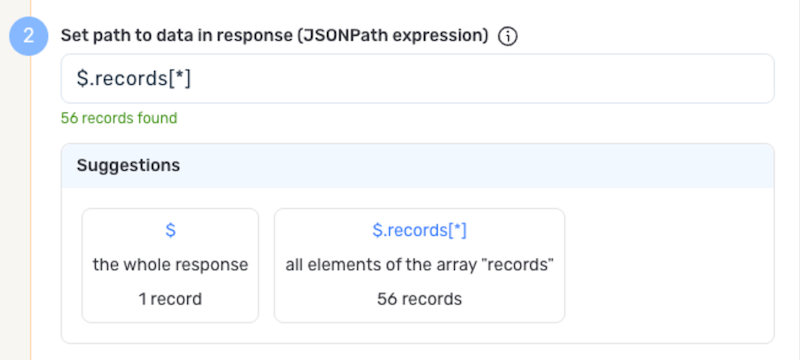
Nexla can also autogenerate data path suggestions based on the response from the API endpoint. These suggested paths can be used as-is or modified to exactly suit your needs.

  • To use this feature, click the Test button next to the Set API URL field to fetch a sample response from the API endpoint. Suggested data paths generated based on the content & format of the response will be displayed in the Suggestions box below the Set Path to Data in Response field.

  • Click on a suggestion to automatically populate the Set Path to Data in Response field with the corresponding path. The populated path can be modified directly within the field if further customization is needed.
    PathSuggestions.png

Metadata

If metadata is included in the response but is located outside of the defined path to relevant data, you can configure Nexla to include this data as common metadata in each record. For Leapsome endpoints, this is useful when you want to preserve pagination tokens or response-level context alongside each record.

  • To specify the location of metadata that should be included with each record, enter the path to the relevant metadata in the Path to Metadata in Response field.

    • For Leapsome JSON responses, enter the JSON path to the metadata object or field.

Request Headers

Optional
  • If Nexla should include any additional request headers in API calls to this source, enter the headers & corresponding values as comma-separated pairs in the Request Headers field (e.g., header1:value1,header2:value2).

    You do not need to include the Authorization header here — Nexla automatically adds the Bearer token from your Leapsome credential to every request.

Endpoint Testing

After configuring all settings for the selected endpoint, Nexla can retrieve a sample of the data that will be fetched according to the current configuration. This allows users to verify that the source is configured correctly before saving.

  • To test the current endpoint configuration, click the Test button to the right of the endpoint selection menu. Sample data will be fetched & displayed in the Endpoint Test Result panel on the right.

  • If the sample data is not as expected, review the selected endpoint and associated settings, and make any necessary adjustments. Then, click the Test button again, and check the sample data to ensure that the correct information is displayed.

Save & Activate the Source

  1. Once all of the relevant steps in the above sections have been completed, click the Create button in the upper right corner of the screen to save and create the new Leapsome data source. Nexla will now begin ingesting data from the configured endpoint and will organize any data that it finds into one or more Nexsets.